Automations
Most EA governance is a list of things somebody promised to do by hand: raise a risk when an application crosses a cost threshold without an owner, chase the technical owner when a component reaches end of life, warn the business owner when an approved card is edited. The list is right; the doing is what slips, because each item is a reminder in someone's head rather than a rule the platform keeps.
Automations turns those promises into rules Turbo EA runs for you. A rule is built entirely from dropdowns — when something happens in the landscape, if conditions hold, then take actions — and every run is recorded as a mutation batch in the Audit log, so a rule that went wrong is undone with one click.
At a glance
| Licence | Commercial — a signed entitlement is required |
| Minimum Turbo EA version | 2.128.0 |
| Permissions | ext.automations.view, ext.automations.manage |
| Data access grants | Cards (read + write), card and todo events, todos (read + write), the user directory, risks (read + write), decision records, notifications, stakeholder roles |
| Backend restart needed | Yes — it ships backend code |
| Where it appears | Automations in the Admin section of the user menu · a run-count chip on card detail |
A rule: when, if, then
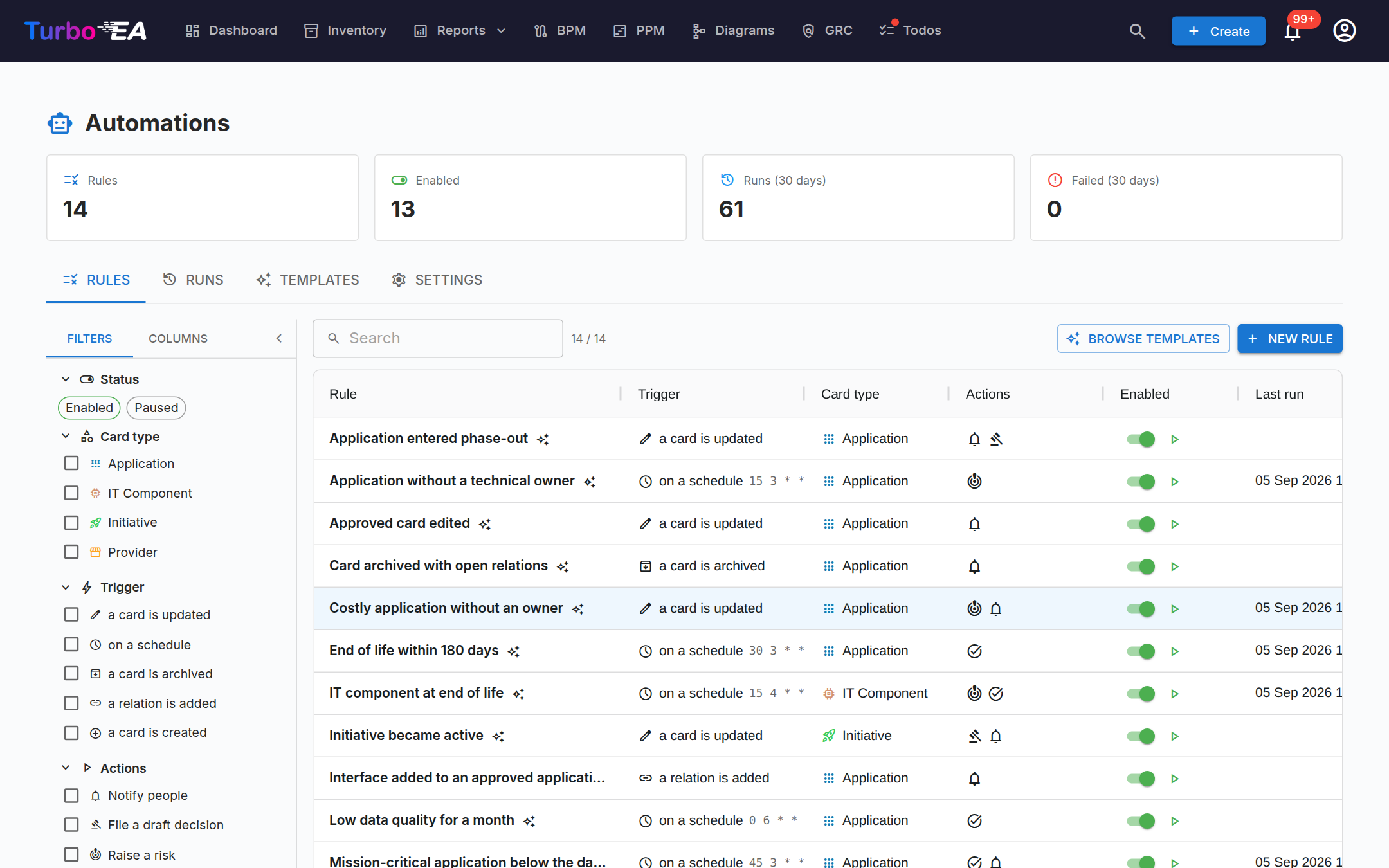
The Rules tab lists every rule with its trigger, card type, actions, an enabled switch, its last run and a play button. Open one to see the editor.
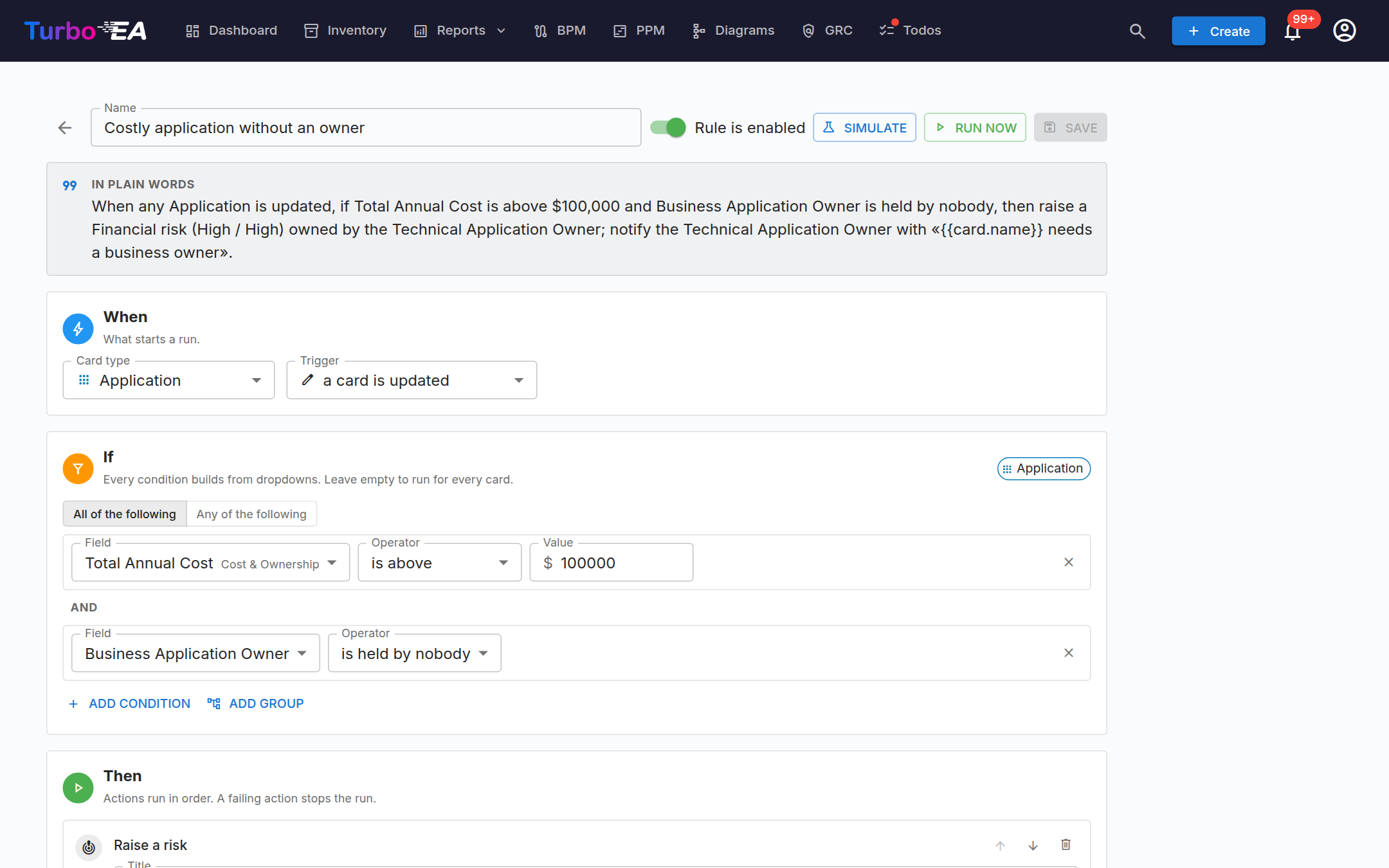
The editor reads the rule back to you in plain words at the top, then walks through its three parts:
When — what starts a run. A rule watches one card type and fires on one of:
| Trigger | Fires when |
|---|---|
| a card is created / updated / archived / restored | that card changes |
| a relation is added / removed | a relation of an optional given type touches the card |
| a todo is completed | a todo attached to the card is closed |
| on a schedule | a five-field cron expression (UTC) comes round — the rule then checks every card of the type |
If — the conditions, as nested all of / any of groups. Each row is a field, an operator and a value picked from dropdowns: the card's own fields and lifecycle phases, its tags, its stakeholder roles (is held by nobody, is held by…), its relations, its end-of-life status on Applications and IT Components, and — on a card is updated — what changed, so a rule can fire only when a value moved from one state to another. Leave the group empty to run for every card.
Then — the actions, run in order. A failing action stops the run and the run row says which step failed.
| Action | What it does | Needs |
|---|---|---|
| Set / clear a field, set a lifecycle date, set the subtype, parent, name or description | Edits the card | inventory write |
| Set tags | Replaces, adds or removes tags, respecting single-choice groups | inventory write |
| Create a related card, link a relation | Adds a card of another type and connects it, or connects two existing cards | inventory write |
| Archive the card | Archives it (recoverable for 30 days) | inventory write |
| Assign / remove a stakeholder role | Gives a role to a person, a role holder, the parent's role holder or the person who triggered the rule | stakeholder roles |
| Create a todo | A todo on the card for an assignee, with a due date | todos |
| Notify people | An in-app / email notification to the recipients' own preferences | notifications |
| Raise a risk, update a risk | Files a risk in the Risk Register with category, probability and impact, linked to the card and owned by someone; a later run can update its title, owner or target date | risks |
| File a draft decision | A draft Architecture Decision Record linked to the card — never signed by a rule | decision records |
| Call a webhook | A signed HTTPS request to an external system with the card, what changed and the rule | — |
| Stop | Ends the action list | — |
Titles, descriptions and messages are templates: {{card.name}},
{{card.attributes.costTotalAnnual}}, {{actor.name}}, {{change.old}} and
the like are filled in per card, and the editor offers the variables from a
menu.
Two options sit under the actions. Fire once per card (on by default) remembers what a rule fired for, so a nightly rule does not raise the same risk every night; it fires again when the values it reads change. Nightly catch-up re-checks every card at 03:00 UTC, so a missed event self-heals.
Simulate and Run now
Simulate runs the rule against every card of its type in preview mode — nothing is written — and shows how many cards match and, per card, exactly what each action would do. Enabling a rule that has never been simulated asks you to simulate first; you can still enable it without.
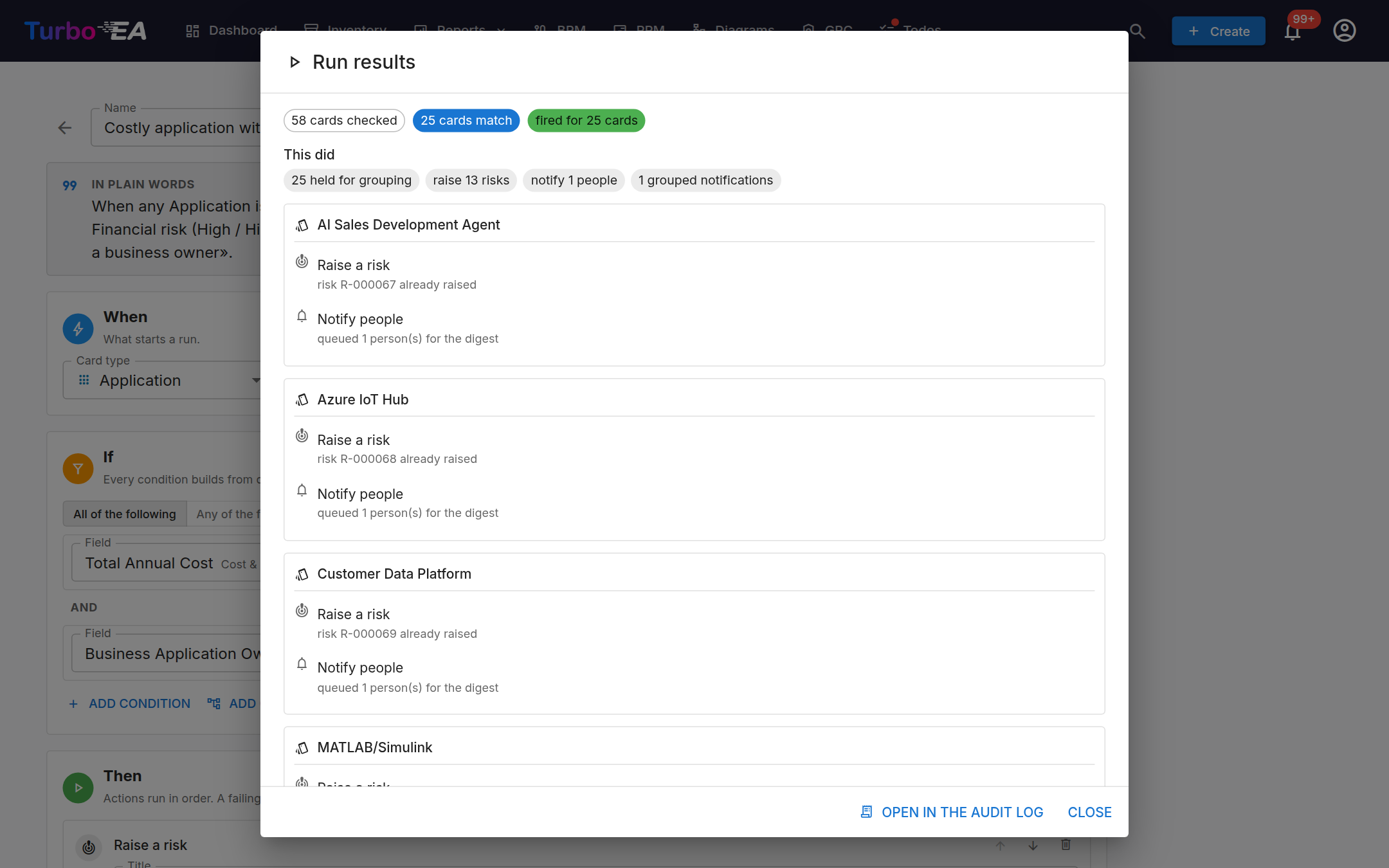
Run now does the same for real: it fires for every matching card immediately, respecting fire once per card unless you tick fire again for cards it already handled. The result dialog shows what was done, card by card, and links to the audit batch.
Runs and the Audit log
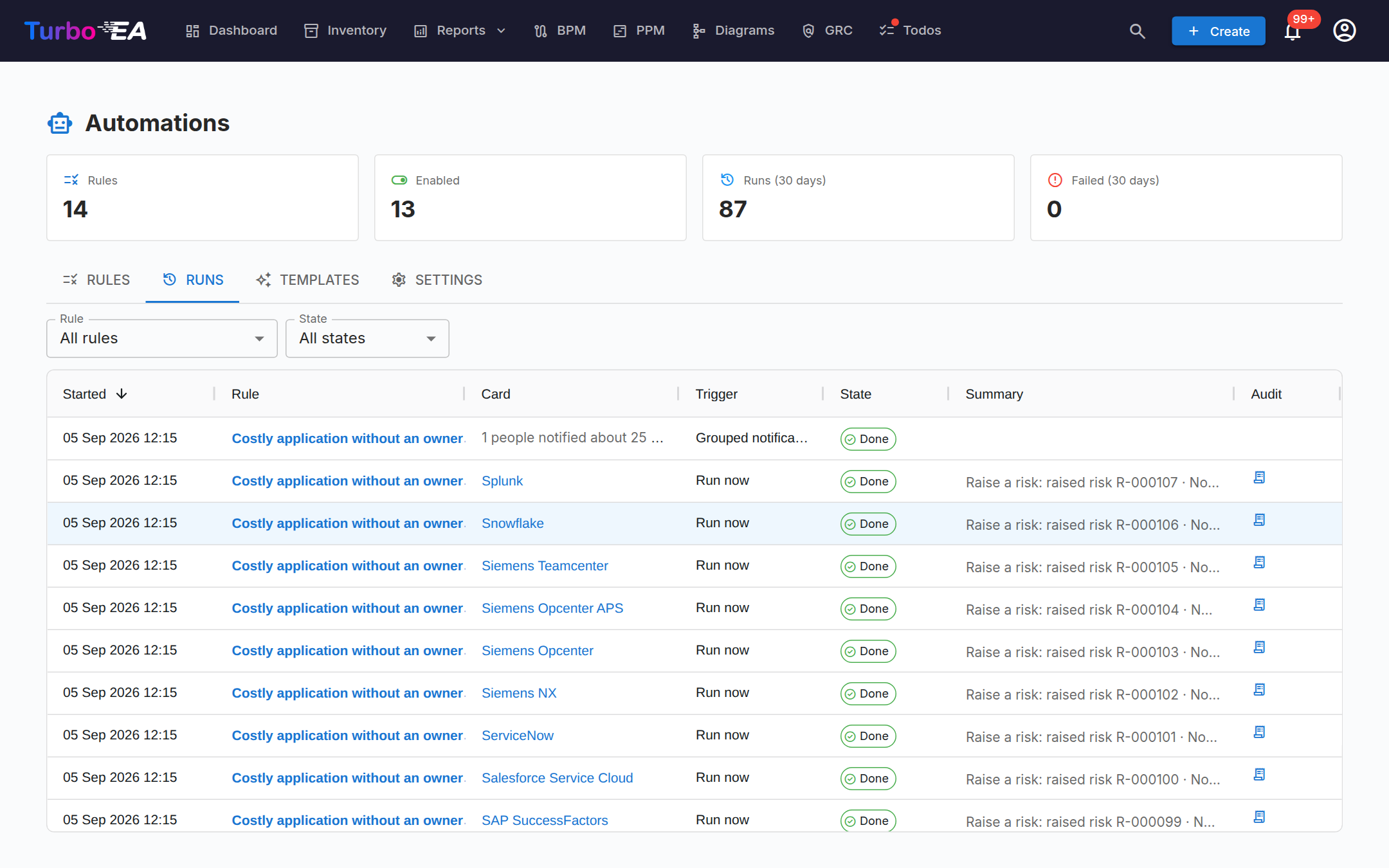
Every run is a row on the Runs tab: which rule, on which card, how it started (an event, the schedule, the nightly catch-up, Run now), how it ended and every action line. Filter by rule or outcome; a card's own run count sits as a chip on its detail page.
Every write a run makes lands in Admin → Settings → Audit log as an extension batch with per-event diffs. A scan — a schedule, the nightly catch-up or Run now — is one batch for every card it fired on, so a rule that went wrong is one Rollback, not one per card. Rollback reverts the card and relation writes and, from Turbo EA 2.127.0, the risks the run raised or edited, the roles it assigned, the tags it set and the draft decisions it filed. Todos and notifications are deliberately left in place — a request to a person and a delivered message are not undone by deleting them — and the rollback preview says so before anything is applied.
Notifications are grouped
A rule never sends one notification per card. A scan collects what each person is owed and sends one notification per person and rule at the end — a single card arrives as its own message, several as a digest that names the cards, whose title you set in the action (Digest title). Changes arriving one by one — an import touching three hundred cards — send the first notification at once and hold the rest for the grouping window in Settings; the next minute sends what accumulated as one digest. Each person's own notification preferences still decide bell, email or an extension channel.
Clicking a grouped notification in the bell opens its details in place — the full digest and one chip per card that takes you to that card — because the Runs tab behind it is an admin page; only people with ext.automations.view also get an Open button to it. A single-card notification still takes you straight to the card. Every Automations notification uses its own Automations notifications row in your notification preferences (in-app on, email off by default), separate from the generic Extension notice.
Templates
The Templates tab is a gallery of ready-made rules — a costly application without an owner, end of life within 180 days, a new application without a business capability, an approved card that was edited, low data quality for a month, an application entering phase-out, a card archived with open relations, an initiative becoming active, a critical application without a technical owner, a new provider registered, an IT component at end of life. Each opens in the editor, disabled, for you to adjust and simulate.
Settings
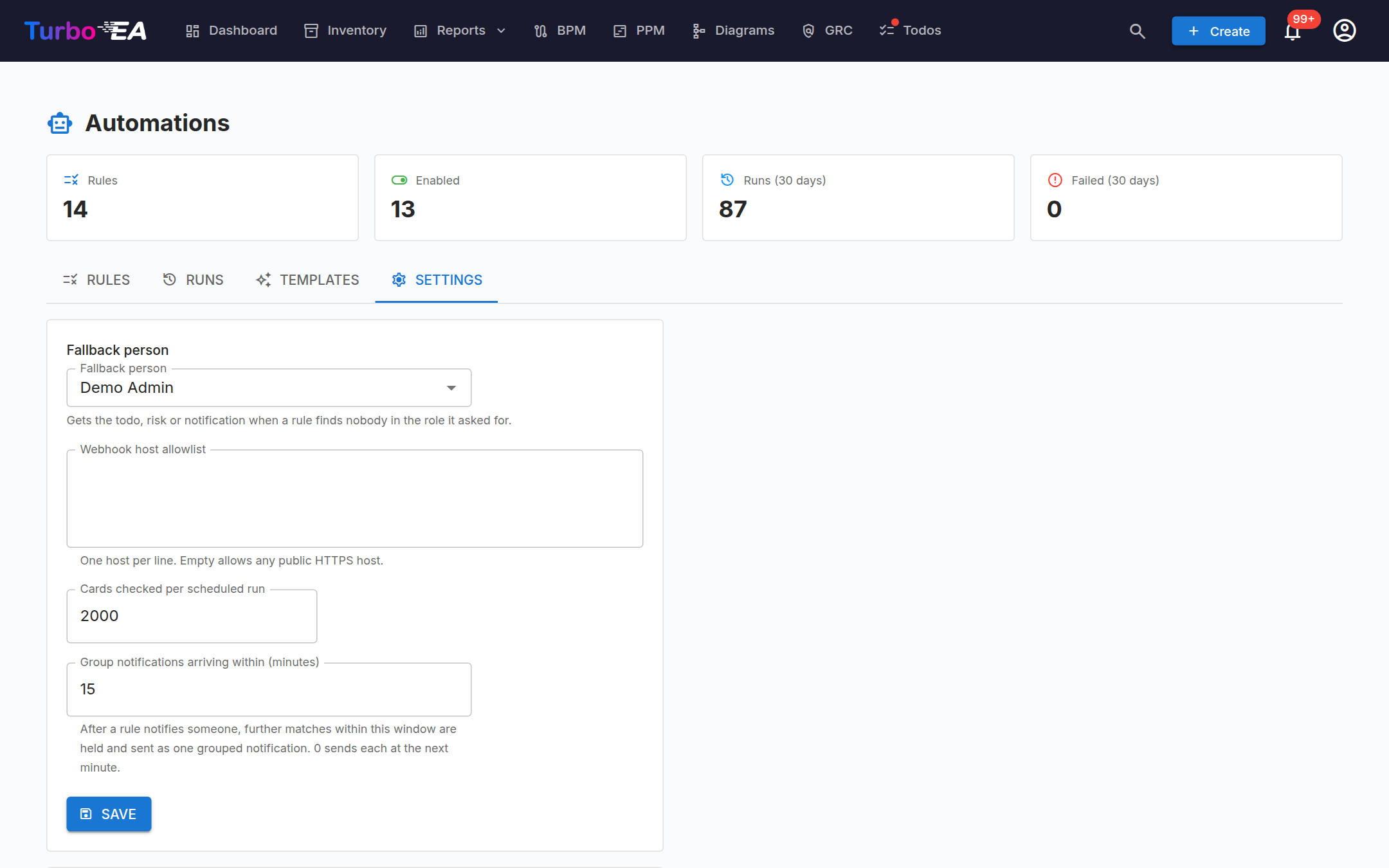
| Setting | What it does |
|---|---|
| Fallback person | Receives the todo, risk or notification when a rule finds nobody in the role it asked for |
| Webhook host allowlist | Hosts the Call a webhook action may reach, one per line; empty allows any public HTTPS host. Private and internal addresses are always refused |
| Cards checked per scheduled run | How many cards one scheduled scan looks at before it stops and leaves the rest to the next one |
| Group notifications arriving within | The grouping window, in minutes; 0 sends each at the next minute |
Demo data
Load demo data in Settings installs the templates and three showcase rules on the sample landscape, enables most of them and runs a few once, so the Rules, Runs and Audit log tabs have something to show. Remove takes exactly that back out — rules, runs, the todos and risks they created.
Permissions
| Permission | Grants |
|---|---|
ext.automations.view |
See the rules, their runs and the templates gallery, and the run-count chip on cards |
ext.automations.manage |
Create, edit, enable, simulate, run and delete rules; change the settings; load demo data |
If the licence lapses or the extension is disabled
The page disappears from the menu, the schedules stop and events are no longer dispatched. Nothing is deleted: the rules, their runs and everything they wrote — cards, risks, todos, decisions — stay exactly as they are. Renewing the licence or re-enabling the extension brings the rules back, still enabled.
Notes and limitations
- Turbo EA allows an extension 60 audited batches a minute. A scan over a very large inventory pauses at that cap and continues on the next tick; Run now says so in its result and the next scan picks up the remaining cards.
- A rule watching a card is updated only sees changes made after it was enabled; use Run now or wait for the nightly catch-up for the existing landscape. Conditions on what changed match live updates only.
- Webhooks are HTTPS only, signed with a per-instance secret, never follow redirects and time out after 10 seconds; the response is recorded on the run.
- A rule can update only the risks it raised, and it can never sign a decision, transition a risk or complete a todo — those stay human acts.