Platform Migration
The platform-migration importer (Admin → Settings → Migration) ingests a complete enterprise-architecture workspace from a supported source platform and lands it as Turbo EA cards, relations, tags, stakeholders, documents, comments, and a fully-fleshed-out metamodel in one staged, reviewable operation.
Supported sources
| Source | Format |
|---|---|
| SAP LeanIX | Full Snapshot xlsx workbook (Administration → Export → Full Snapshot) |
Additional source platforms (Ardoq, Mega HOPEX, BiZZdesign, Avolution Abacus, …) plug into the same staging + apply pipeline via per-source adapters. When a new adapter ships, it appears automatically in the Source platform picker on the upload dialog with no admin configuration required.
Who is this for?
Customers moving from one of the supported source platforms to Turbo EA. Each source has its own adapter that translates the source's native shape (fact sheets / components / objects / elements …) into Turbo EA cards.
LeanIX
The LeanIX adapter accepts the Full Snapshot xlsx workbook — the multi-sheet export with one sheet per fact-sheet type, one sheet per relation type, plus TagGroups, Tags, Documents, Comments, Types, and a ReadMe reference sheet. Files that fail the adapter's payload check are rejected at the upload step with a clear error.
How to obtain the export
In LeanIX, open Administration → Export → Full Snapshot. This produces a single XLSX workbook containing every active fact sheet, plus its relations, tag groups, tags, documents (called resources in LeanIX), and comments.
Archived fact sheets are not included in the Full Snapshot — restore them in LeanIX first if you need them to land in Turbo EA.
The workflow
-
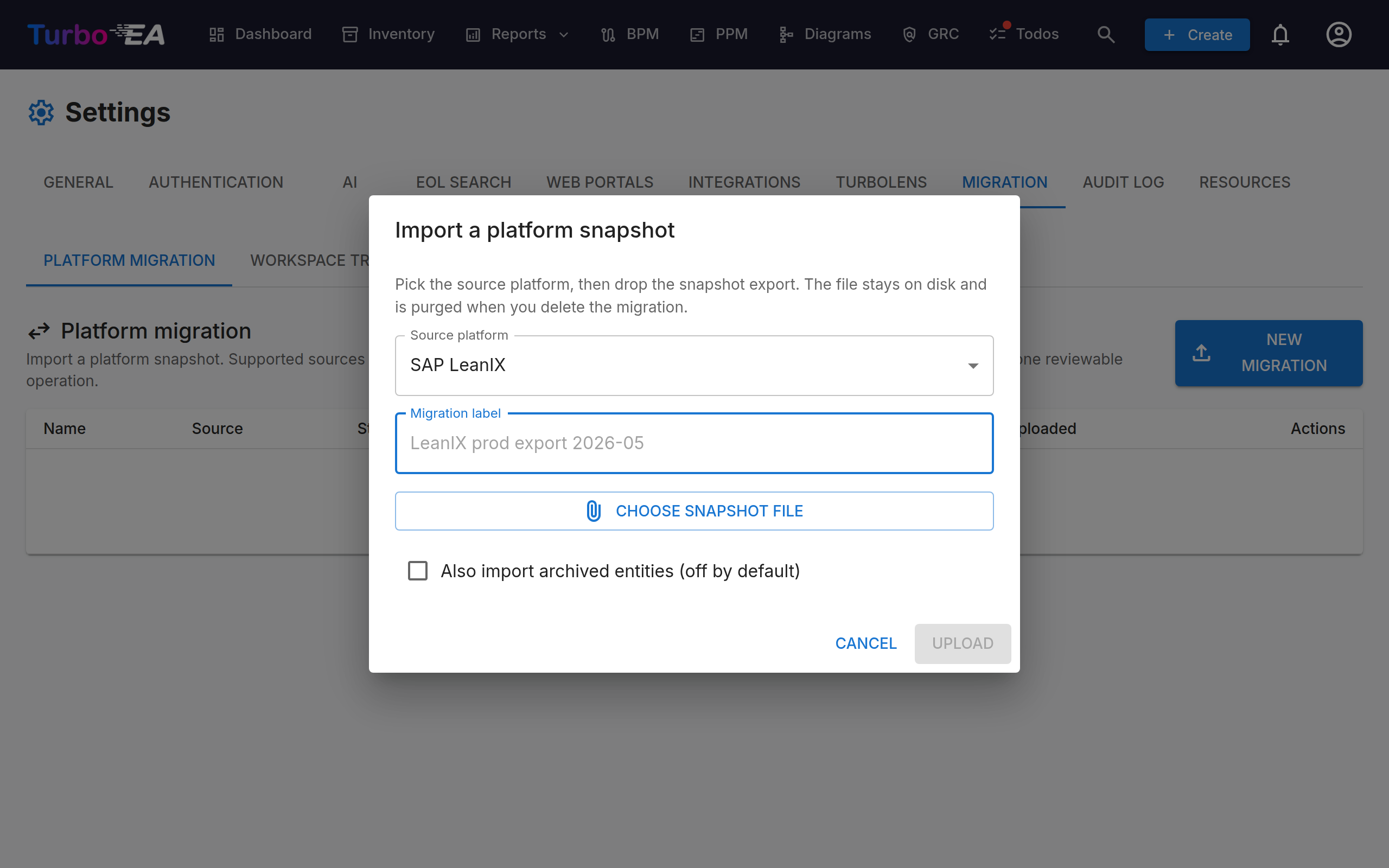
Upload the snapshot at Settings → Migration → New migration. Pick the source platform (LeanIX is the only option today), give the migration a label, and attach the snapshot file. The file stays on the server's disk; the database only holds metadata. Parsing runs in the background and the status moves through
uploaded → parsedautomatically. -
Review each entity kind in the per-tab view. Every staged row carries an action:
create— will be added to Turbo EAupdate— exists already; diff-fields will be mergedskip— exists already with no changesconflict— endpoint missing, type unmapped, built-in collision, malformed email, etc. — see the Note column for the full reason text
Each tab shows a row of filter pills above the table — one pill per card type when applicable, otherwise per action — so you can narrow a large list (hundreds of cards, tens of fact-sheet types) to one slice at a time. The Cards tab shows the resolved card name alongside the source UUID. The Note column renders the full conflict reason, and update rows show the changed field names with a tooltip spelling out the
old → newtransition.The New types, Custom fields, and New relations tabs surface tenant-customised metamodel from your source workspace. By default, these are accepted as-is and create matching non-built-in card types / fields / relation types in Turbo EA.
-
Map imported fields (optional, in the Custom fields tab). For each source-platform custom column, pick one of three outcomes from the dropdown next to the row:
- Import as new custom field (default) — the column lands as a new attribute on the target card type, under a synthetic Imported from {source} section.
- Map to an existing Turbo EA field — route the value onto a built-in field on the target card type (e.g. send LeanIX
businessCriticalityto TEA's ownbusinessCriticalityslot). The metamodel-field row is then skipped at apply time, so no orphan column is created. - Map to a lifecycle phase — for date columns, route the value onto the standard
plan/phaseIn/active/phaseOut/endOfLifeslot incard.lifecycle. Date / datetime values are auto-coerced toYYYY-MM-DD(theT00:00:00suffix that some platforms write for datetime cells is stripped); unparseable values are dropped so they can't corrupt the lifecycle map. - Do not import this field — the column is skipped entirely, both as an attribute and as a metamodel field.
The mapping is per-migration and can be edited any time the status is
parsedorpreviewed. Source-platform core columns the adapter routes directly into Turbo EA standard slots (e.g. LeanIXname,displayName,description,status,category → subtype,lifecycle:*,qualitySeal,completion) are listed at the top of the tab in a read-only info banner — those have no mapping decision to make. -
Apply when you are satisfied. The apply pipeline runs 12 dependency-ordered passes (metamodel types → metamodel fields → metamodel relation types → users → cards → tag groups → tags → card-tag links → relations → subscriptions → documents → comments) inside individual savepoints — one failing row does not poison the rest of the import. Status moves through
applying → applied(orfailedif errors cross the safety threshold).If the parsed snapshot contains any conflict rows, a warning banner appears above the staging tabs (with clickable chips that jump to the affected tab) and clicking Apply opens a confirmation dialog spelling out which kinds carry conflicts. You have to explicitly acknowledge that the conflicted rows will be skipped before the apply runs. The post-apply Apply result shows a dedicated conflicts chip alongside created / updated / skipped / errors — conflicts are not silent skips, they're a first-class outcome the admin sees in the migration history.
What gets imported
| LeanIX | Turbo EA |
|---|---|
| Application, ITComponent, Business Capability, Business Context, Process, DataObject, Interface, Provider, TechCategory, Platform, Objective, Project / Initiative | Direct 1:1 card-type mapping |
| User Group | Organization with subtype team, tagged leanix_origin=UserGroup |
| Lifecycle phases (plan / phaseIn / active / phaseOut / endOfLife) | Carried verbatim onto cards.lifecycle |
Hierarchy (childParentRelation) |
Folded into Card.parent_id |
Successor / predecessor edges (*SuccessorRelation) |
Stored as relations; direction is flipped on import so Turbo EA's "source succeeds target" convention matches LeanIX's "X has successor Y" semantic. The new tenant card types have has_successors=true so the lineage view renders. |
Relations (50+ default LeanIX edge types, both xlsx-style applicationITComponentRelation and GraphQL-style relApplicationToITComponent names) |
Native Turbo EA relations with edge attributes |
| Tenant-defined relation types (Server↔Application, lxSystem, lxDora, microservice, ESG, etc.) | New non-built-in relation_types rows, created automatically in the same import pass so every edge actually lands |
| Tags (single / multi groups) | Tag groups + tags + per-card joins |
| Subscriptions (one per RESPONSIBLE / OBSERVER role) | Stakeholder rows; users auto-created as deactivated (is_active=false) |
| Documents (URL) | Document attachments |
| Comments (top-level + replies, flattened) | Comment rows |
Tenant-custom fact-sheet types (e.g. ESGCapability, Server, System, TechPlatform, TechnicalStack) |
New non-built-in card types with has_hierarchy=true, has_successors=true, and an Imported from LeanIX field section pre-populated |
| Tenant-custom fields | Appended to the target type's fields_schema under a synthetic Imported from LeanIX section. Field type and complete enum option list are lifted from the workbook's ReadMe reference sheet — so currentMaturity lands as a single-select with all 5 values (adHoc, repeatable, defined, managed, optimized) even when the data uses only one |
| Tenant-custom relation types | New non-built-in relation types, endpoint types translated through the LX↔TEA type map (UserGroup → Organization, etc.) |
Why the ReadMe sheet matters
The first sheet of the xlsx (ReadMe) is LeanIX's authoritative field reference: every column documented with its type (String, Integer, Percent, Datetime, Boolean, String list) and, where applicable, its full enum constraint (Possible values: one of A, B, C.). The importer reads this sheet first and uses it as the primary source of truth for field metadata — falling back to the in-data Types sheet only when the ReadMe doesn't cover a column. This is the difference between an imported field that's a free-text input and one that's a proper dropdown with the right options.
What does not get imported
The snapshot does not carry these — the importer surfaces what is missing in the per-row Note column:
- Document binaries — only URLs are in the snapshot; the importer creates link-style Document rows. Re-upload binaries by hand.
- Comment threading — replies are flattened to top-level comments to preserve the prose; thread parents would require LeanIX UI metadata that isn't in the snapshot.
- User passwords and SSO bindings — auto-created users land deactivated. Invite them or bind them to SSO afterwards.
- Audit history prior to the import — Turbo EA's history starts at the apply timestamp.
- Diagrams / poster views / dashboards / saved searches / notification preferences / API tokens / webhooks — no equivalent in Turbo EA, or no analog in the snapshot.
Exporting to SAP LeanIX
The same page also runs in reverse. Export workspace (next to New migration) downloads the current workspace as a LeanIX Integration API bundle — a .zip you load through Administration → Integration API in LeanIX. LeanIX cannot import its own Full Snapshot workbook (SAP restores snapshots on request), so the Integration API is the one bulk import a LeanIX administrator can run alone.
The bundle contains:
ldif.json— the data in the LeanIX Data Interchange Format: one item per card (the fact-sheet type named the LeanIX way —Processfor Business Process,Projectfor Initiative,UserGroupfor Organization — with name, description, subtype, lifecycle phases, every attribute, tags, stakeholders as subscriptions and document links) and one item per relation under LeanIX's relation names (relApplicationToITComponent, …). The hierarchy becomesrelToParent; lineage relations are written in LeanIX's direction. The Turbo EA card id is stored as the fact sheet's external id, so running the bundle twice updates rather than duplicates.processors.json— the processor configuration generated for exactly this export: one fact-sheet processor per type writing only the fields the cards carry, one relation processor per relation type, plus tag, subscription and resource processors. The processing mode is partial: nothing in the target workspace is deleted, and an update keeps LeanIX's value when the exported card has none.comments.json— comments, which the Integration API cannot import, kept for reference.README.md— the load steps (browser and REST), the types and relations in the export, and what to adjust.
To load it: create a processor configuration in Administration → Integration API with the connector details from the README, paste processors.json as the configuration and ldif.json as the input, click Test run to see every problem without writing anything, then Run. LeanIX reports any field, subtype, relation type or user its workspace does not have — add it there or remove that entry from processors.json. Types created in Turbo EA are exported under their own key and need the same type in the LeanIX meta model first.
Archived cards are left out unless Include archived cards is ticked. The export is gated by admin.export_workspace, the same permission as the workspace bundle export, because the file is the whole landscape.
Re-running an import
Idempotency is built in. The migration_identity_map table records the source-side → Turbo EA UUID for every entity that has been imported (keyed by (source_id, entity_kind, source_type) so the same external id can legitimately exist in imports from two different sources). A re-upload of the same snapshot (or an updated snapshot from the same workspace) detects existing entities and writes update / skip staged rows rather than duplicate creates. The card's external_id carries the source-side id (LeanIX factSheetId, Ardoq component id, …) so the link survives even if the identity map is wiped.
If you need to redo an import (e.g. you bulk-deleted the imported cards in the UI and want to land them fresh), use the trash icon on the migration row to delete it, then re-upload. applied migrations are deletable; doing so releases the (file_hash, source_type) idempotency lock so the same snapshot can be uploaded again. Dangling migration_identity_map rows that point at cards that no longer exist are auto-pruned on the next staging pass, so a manual cleanup of the identity map is never required.
Permission
This page is gated by the admin.migrate permission. Only the admin role holds it by default; grant it explicitly to other roles in Settings → Roles if you want a non-admin to drive the migration.
Limitations to plan for
- One in-progress migration per
(file_hash, source_type)pair. Re-uploading the exact same bytes for the same source while a migration is still active returns the existing migration record (the SHA-256 hash + source key is the natural idempotency key). Delete the migration record first if you really want a fresh ingest of the same file. Uploading the same hash under a different source key (if you ever do) lands as a separate migration. - Large workspaces (10k+ fact sheets): the parser is streaming, but the apply pipeline writes rows in one transaction per pass. Plan ~15 minutes for very large imports.
- Custom fields, values, and tags are tolerated, not pre-mapped. Any LeanIX column that isn't in Turbo EA's built-in metamodel lands on the imported card's
attributesmap verbatim and is surfaced in the Custom fields tab so an admin can promote it (route it to an existing TEA field, a lifecycle phase, or skip it — see Map imported fields in the workflow above). Same for tenant-defined tag groups and for relation types source platforms have added (e.g.lxSystemSystem*,*Lx*Dora*,microservice*,eSGCapability*) — they appear in the New types / New relations tabs unchanged, ready for an admin decision. - Subscription emails can use either delimiter. The LeanIX "Full Snapshot" export delimits emails inside
subscriptions:<RoleType>[:<RoleName>]cells with;; the GraphQL CSV export uses,. The parser accepts either. Rows whose email is malformed (missing@, or an unsplit delimiter slipped through) are staged asconflictwith a clear reason instead of being created as bogus users — fix the source export and re-upload.
Cleanup
Deleting a migration record (Settings → Migration → trash icon) removes both the database rows for that migration (staged records cascade) and the snapshot file on disk. uploaded, parsed, previewed, failed, aborted, and applied migrations are all deletable; an applying migration must finish (or fail) before it can be removed.