Roadmap Studio
Every EA function is asked the same two questions by its CIO: what will the landscape look like in three years, and what happens if we choose differently? Slide decks answer the first badly and the second not at all — they go stale the week after the steering committee, and two of them cannot be compared.
Roadmap Studio answers both from the inventory you already maintain. A scenario is a plan laid over your live landscape — retire this, replace that on this date, add these three things that do not exist yet — kept as a set of changes rather than a copy of your graph. Nothing you explore touches your inventory until a plan is approved and applied, and because the plan is read against what the inventory says today, it never silently drifts from reality.
At a glance
| Licence | Commercial — a signed entitlement is required |
| Minimum Turbo EA version | 2.119.0 |
| Permissions | ext.roadmap-studio.view, .manage, .apply, .admin |
| Data access grants | Cards (read + write), card events, todos (read + write), the user directory, decision records |
| Backend restart needed | Yes — it ships backend code |
| Where it appears | Roadmap in the main navigation · a presence chip on card detail · a panel and export section on decisions |
Transformations and scenarios
A transformation is the programme a set of competing plans belongs to — «ERP Modernisation», say — and it names the Objectives the programme is answerable for. Under it sit the scenarios: alternative answers to the same question. One of them may be marked recommended, so the room knows what the architect proposes before the numbers are read.
A scenario outside any transformation is perfectly valid; it simply has no alternatives to be chosen over.
The planning inventory and the roadmap
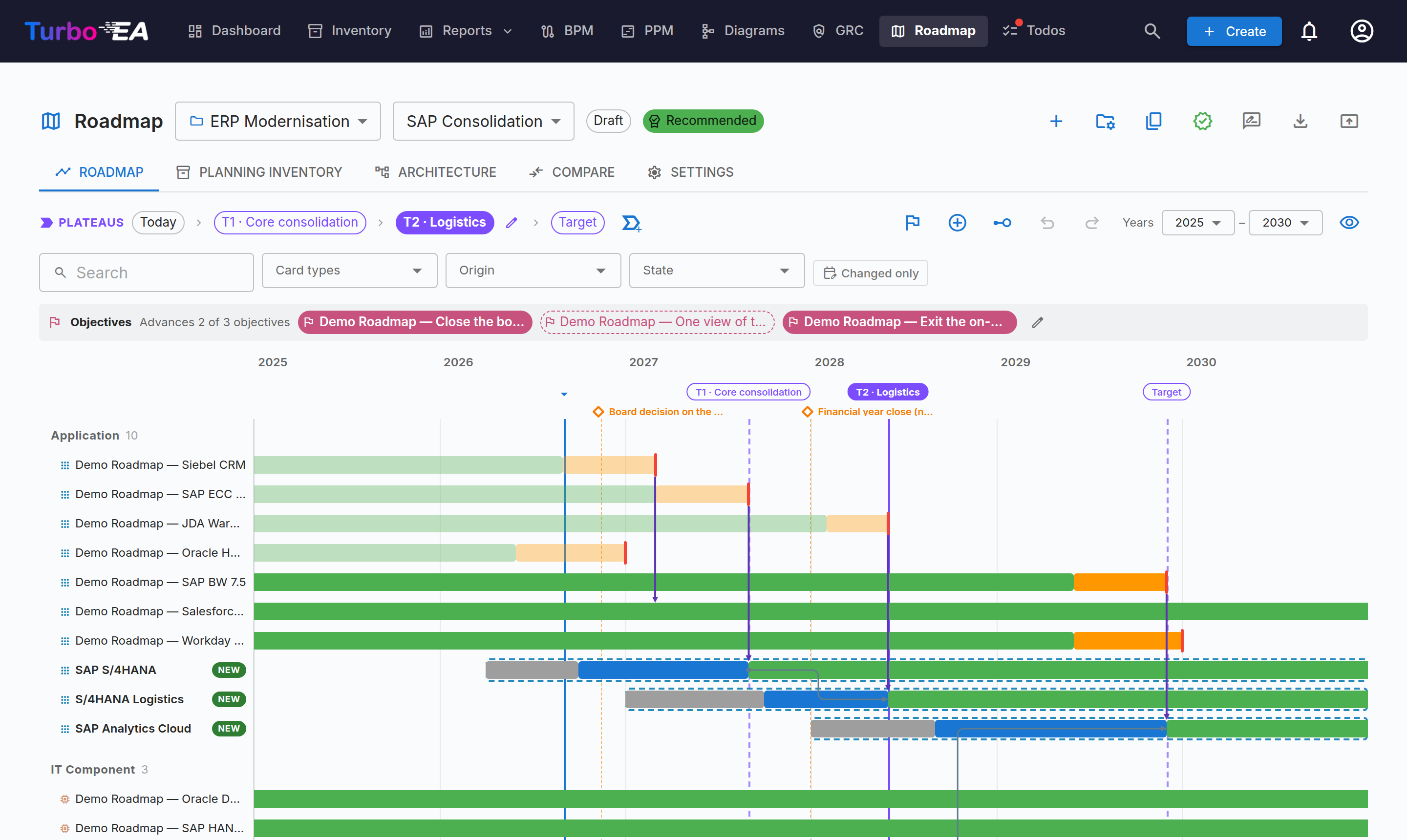
The roadmap draws the plan as dated bars in swim lanes, with a cost band underneath showing the run rate year by year — including the bump during a parallel run, which is the number a migration business case usually hides.
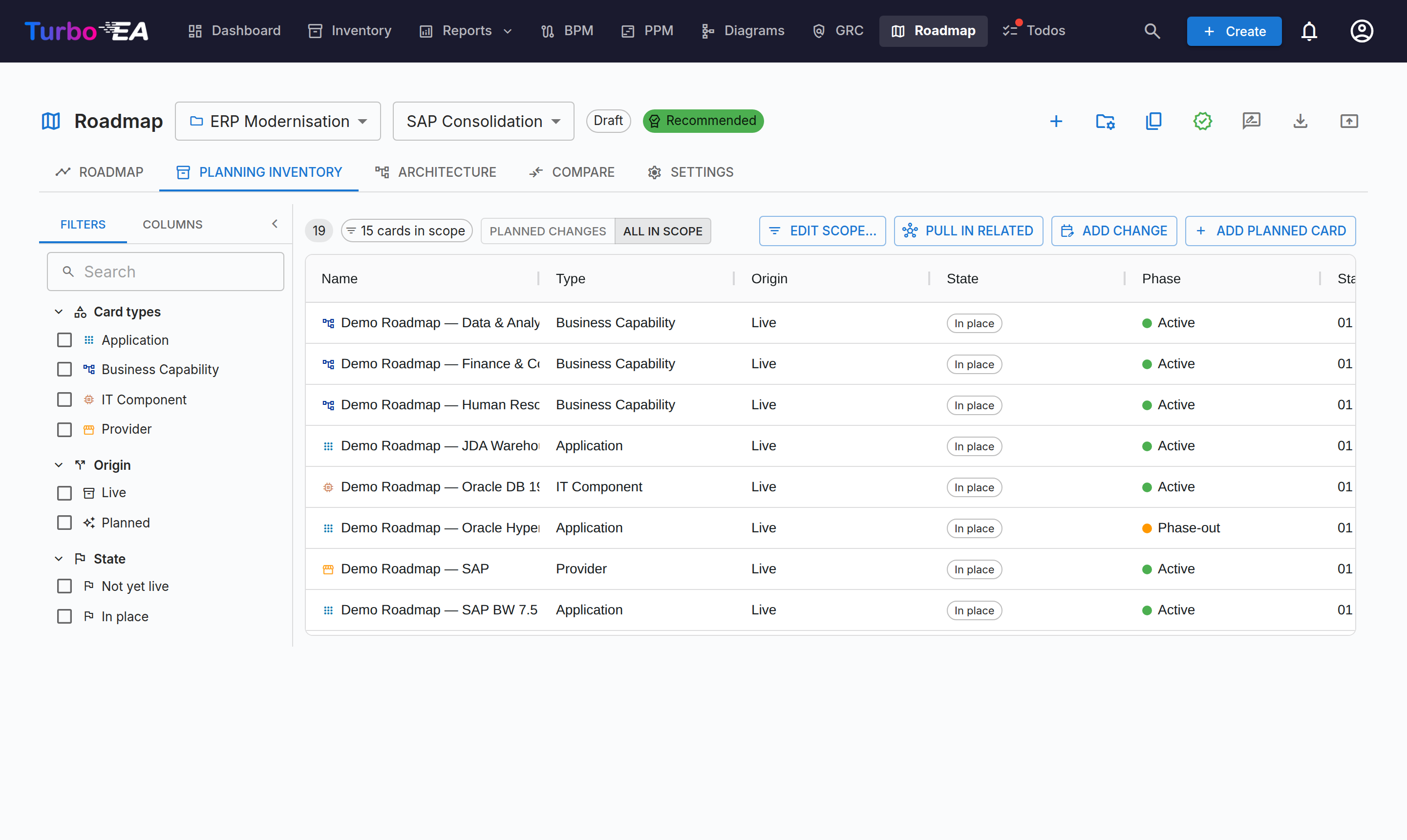
The planning inventory is the same plan as a grid: your live cards plus the planned ones, with every change against them. Planned cards live inside the scenario and never in your main inventory.
Since Roadmap Studio 1.33.0 the grid edits in place, the way the Inventory
does. Tick rows and Mass edit plans one change for each of them — a
retirement on a date, re-dated phases, an attribute value or a one-time cost.
Switch on Edit cells to type a date or a cost straight into a cell, or drag
the fill handle down a column. Export to Excel writes the grid as shown plus
a Plan sheet keyed per row; edit it and Import from Excel previews every
change before it is written. Fill-down and Excel need Turbo EA 2.147.0.
A change whose target card has since been archived, moved or had its dates edited elsewhere is flagged stale, with the reason — so a plan written three months ago tells you what has moved under it.
Plateaus and the architecture slice
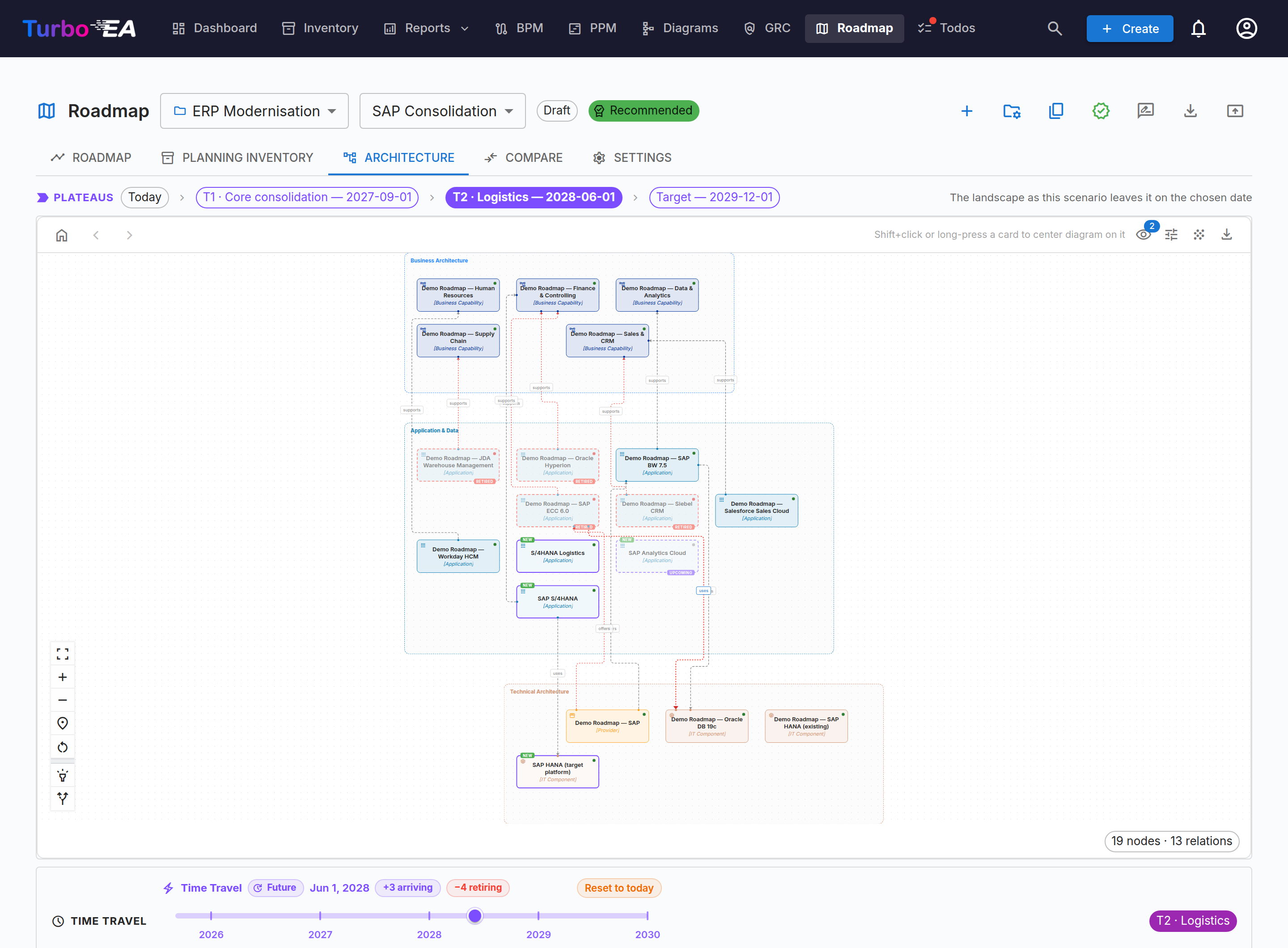
Because every change carries a date, the architecture at any moment is just the scenario evaluated at that date. Name the moments that matter as plateaus — «T1 · Core consolidation, Q3 2027» — and step through them: the roadmap, the dependency view and the numbers all move together.
Comparing scenarios
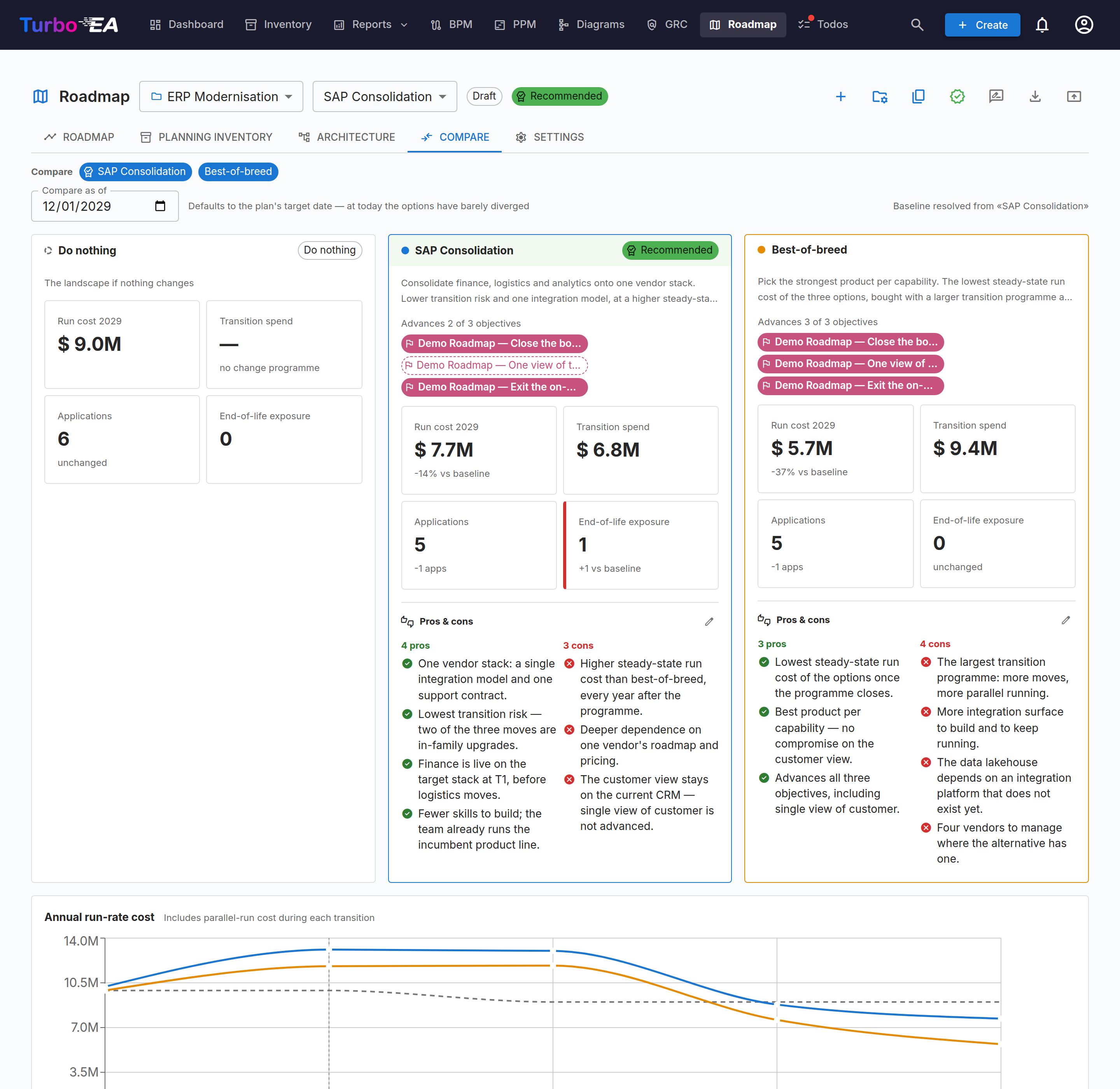
Compare puts each scenario beside the do-nothing baseline on run cost at the horizon, transition spend, card count and end-of-life exposure, with each plan's pros and cons written out beside its figures. An optional discount rate applies to future years.
Where the plan meets the card
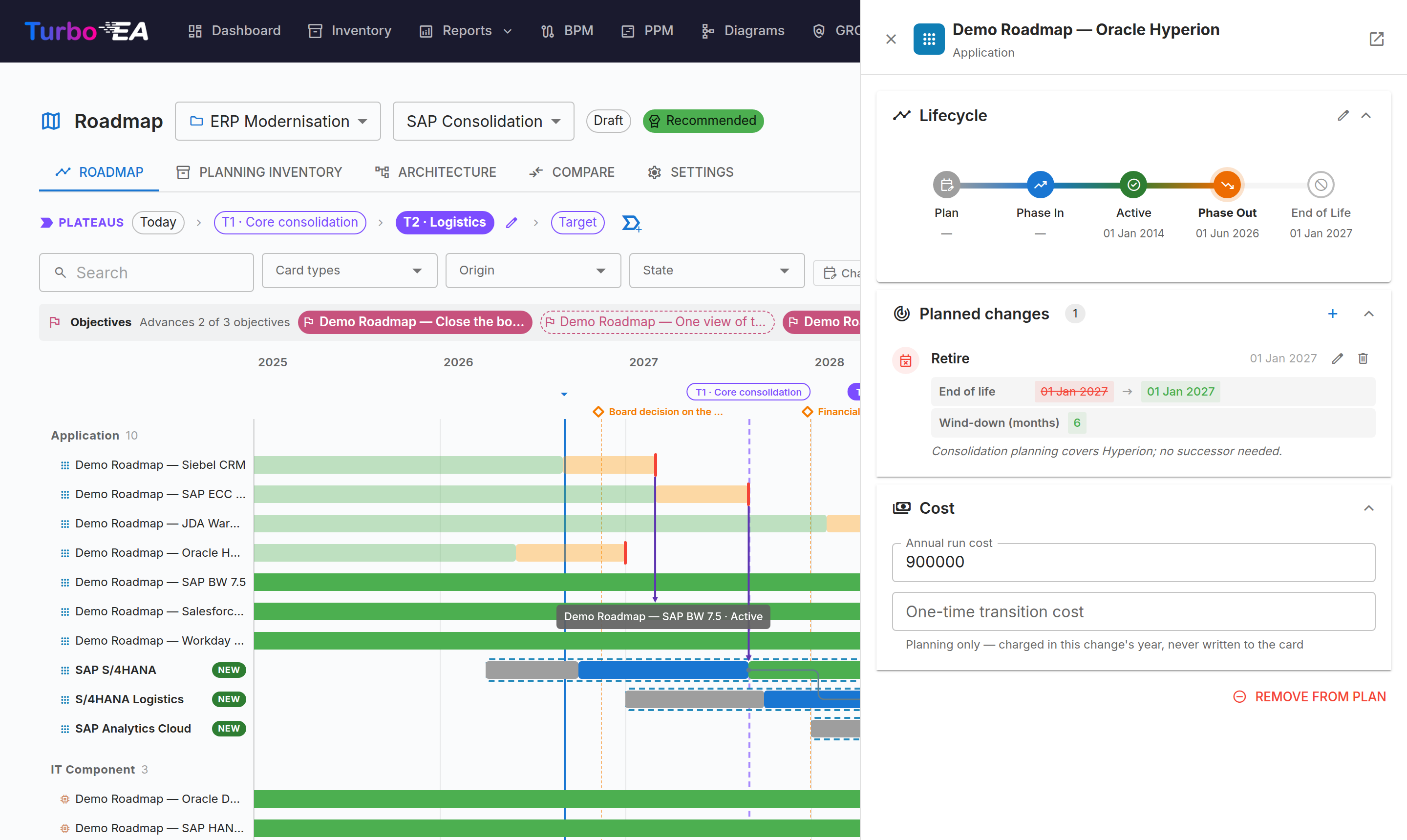
Open any card in your inventory and a chip tells you which plans mention it and how — as something being retired, as the successor in a replacement, or as a card a plan places under a new parent.
Review, decision and apply
This is the governance path, and it separates three things that are genuinely different: advice, the decision, and the write.
1 · Ask for review
Request review names the people whose opinion you want and files a real todo for each of them, so it reaches their Todos page and their notification bell. The picker is the whole user directory — a reviewer is whoever can help with this plan: the security architect for one, the finance partner for another.
Each reviewer answers in the app with Endorse, Request changes or Comment, plus a note. Their answers are advice. They do not decide anything, which is why they no longer use the words «approve» and «reject».
2 · Discuss it
Everyone who can read the plan can write in its discussion. The thread carries the whole story in the order it happened: comments, every review answer (not only the latest), and later the submissions and votes. The board reads the same conversation the reviewers had, rather than being handed a verdict with no argument behind it.
3 · Submit it to the review board
A review board is a named group of people, attached to a transformation (see below). When a plan has one, Submit for decision sends it there:
- the status becomes Awaiting decision and the plan's content locks, so everyone votes on the same document;
- every member gets a Decide on … todo, with the usual assignment notification;
- you choose here whether the approval should file a decision record and create the Initiatives — decided at submission, so the people voting can see what their yes will create.
The approval gate (Admin → Settings, see below) can hold a plan back from its board until reviewers have answered.
4 · The board votes
Each member votes Approve, Reject or Abstain, with an optional note, and may change their vote while the round is open. The dialog shows the tally, how many approvals are still needed, and what every member said.
The round resolves the moment the board's decision rule is settled:
| Rule | Approves when | Rejects when |
|---|---|---|
| Majority (default) | More than half approve | Enough members have refused that a majority is impossible |
| Unanimous | Every member approves | Any member rejects or abstains |
| Any one member | One member approves | Every member has voted, none approving |
A rejection lands as soon as approval has become arithmetically impossible, rather than after everyone has voted on a settled question.
Being on the board is what lets you vote — ext.roadmap-studio.apply is not
required. The plan's author may vote on their own plan; the dialog says so
plainly and the record names who voted.
Withdraw takes a plan back out of the board's hands before it has decided. The author, whoever submitted it and any board member can do it — a board that wants a rework should not have to reject the plan to ask for one. The members' todos are removed, not marked done, and the plan returns to In review.
5 · What approval does
The approving vote does everything at once: competing scenarios in the same transformation are rejected, the plan is locked, outstanding requests are discharged, the Initiatives are created (a programme for the transformation, one project per plateau), and a draft decision record is filed in EA Delivery → Decisions naming the board, its rule, the tally, every vote with its note, the objectives, the plateaus, the figures against doing nothing and each rejected alternative. Signatures are then requested from the members who voted to approve.
An approved plan is read-only until an ext.roadmap-studio.apply holder
reopens it, which clears the approval.
6 · Apply it
Apply writes the plan to your live inventory, under
ext.roadmap-studio.apply. It is a separate action, often months after the
decision. Every write goes through the audited batch machinery, so it appears in
Admin → Audit log and can be rolled back. A .manage user can open the same
plan read-only to check it would land cleanly.
Scenarios without a review board
A scenario outside a transformation, or one whose transformation has no board,
keeps the simpler path: an ext.roadmap-studio.apply holder approves it
directly. A small team with no governance body to convene does not have to
invent one.
Review boards
Boards are managed in one place: Settings → Governance → Manage review
boards inside the Roadmap page (requires ext.roadmap-studio.admin). A board
has a name, a description, up to 25 members and a decision rule. Attach it
to one or more transformations from either side.
Deleting a board detaches the transformations it reviewed; it never deletes them, and it never touches the record of what it decided in the past.
Settings and history
The Roadmap page's Settings tab (requires ext.roadmap-studio.admin) holds:
| Setting | What it does |
|---|---|
| Cost model | Which attribute holds a card's annual run cost, which card types the KPI counts, how far end-of-life exposure looks ahead, and an optional discount rate |
| Approval gate | Whether reviewer answers hold a plan back from its board: never, while changes are requested, or until every reviewer has answered |
| Review boards | Opens the boards dialog |
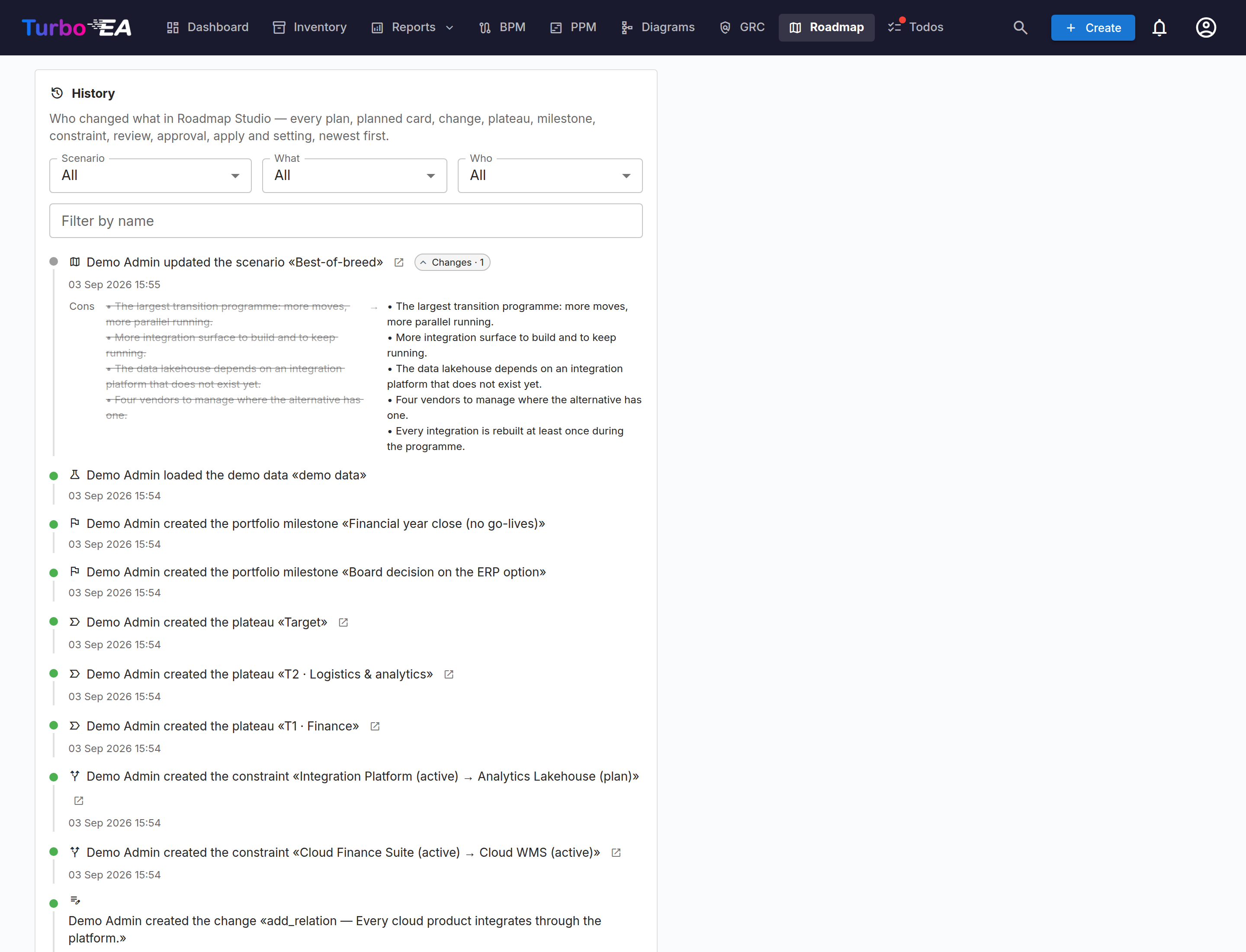
The History card is a full activity ledger — every plan, card, change, plateau, review request, answer, submission, vote, comment and decision, with who did it and what changed.
Present mode and the deck
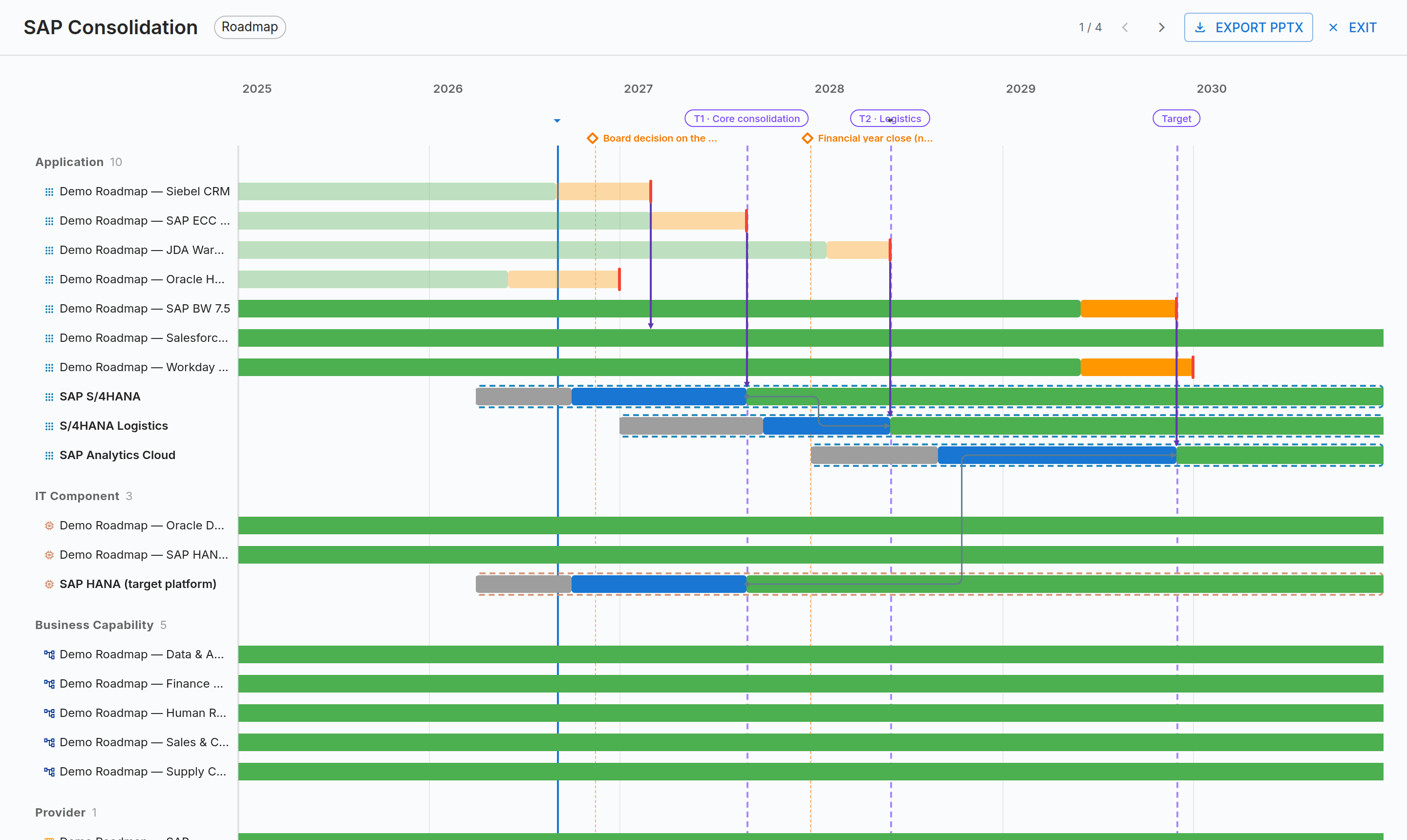
Present mode steps a room through the plan plateau by plateau, and the PowerPoint export follows the same sequence you just walked through.
Demo data
One click in Settings loads a complete sample landscape with two competing scenarios, so you can try everything before entering any of your own data. Another click removes every trace.
Permissions
| Permission | Grants |
|---|---|
ext.roadmap-studio.view |
See scenarios, comparisons, plateaus, the discussion and the decision |
ext.roadmap-studio.manage |
Create and edit plans, request review, submit for decision, withdraw |
ext.roadmap-studio.apply |
Apply an approved plan to the live inventory, reopen it, and approve a plan that has no review board |
ext.roadmap-studio.admin |
Settings, review boards and demo data |
Voting is not a permission: it comes from membership of the board deciding
that plan, plus ext.roadmap-studio.view to open it. Anyone with .view can
write in the discussion.
If the licence lapses or the extension is disabled
The Roadmap page and its API disappear, but nothing is deleted — scenarios, plans, votes and the discussion stay in the extension's own tables. Cards the extension created in your inventory are ordinary cards and are unaffected. Applying a renewed licence brings everything back.
Notes and limitations
- One plan at a time goes to a board within the same transformation.
- No chair and no vote weights. Every member's vote counts once, and there is no casting vote.
- No reminders. A round stays open until the rule settles it or somebody withdraws it.
- The plan's author may vote on their own plan. This is deliberate: a small board whose architect may not vote could not decide anything, and every vote is named in the record.
- The extension ships backend code, so installing or updating it needs a one-off backend restart. Turbo EA shows a banner when this applies.