Digital Autonomy Assessment
Digital Autonomy Assessment brings the Utrecht University Digital Autonomy Assessment Framework (DAAF) into Turbo EA at the application level. It adds a Digital Autonomy section to every Application card — 22 weighted indicators across risk exposure, mitigation capacity and strategic importance, each scored 1–5 against the original DAAF rubric with inline guidance — computes a 1–10 autonomy score automatically, and plots your whole portfolio on an autonomy quadrant report.
It answers a question most landscapes cannot: if this supplier became unavailable, unaffordable, or legally unusable tomorrow, how exposed are we and what could we actually do about it?
At a glance
| Licence | Free — installs and runs with no licence entitlement |
| Minimum Turbo EA version | 2.17.0 |
| Permission | ext.digital-autonomy.view |
| Data access grants | None |
| Backend restart needed | No |
| Where it appears | Digital Autonomy + Digital autonomy score sections on Application cards · Reports → Digital Autonomy · New from template on the Surveys admin page |
Getting started
- Install the extension from Admin → Extensions. There is no licence to apply and no restart — the fields appear immediately.
- Grant
ext.digital-autonomy.viewto the roles that should see the report in Admin → Users & Roles. Administrators already have it. - Decide whether you want the quick or the full assessment — see Quick scan or full assessment below. The full 22-indicator version is active out of the box.
- Score your applications, either card by card or by survey.
The indicators
The Digital Autonomy section appears on every Application card, grouped into eight dimensions (A–H). Every indicator is scored 1–5 on its own rubric.
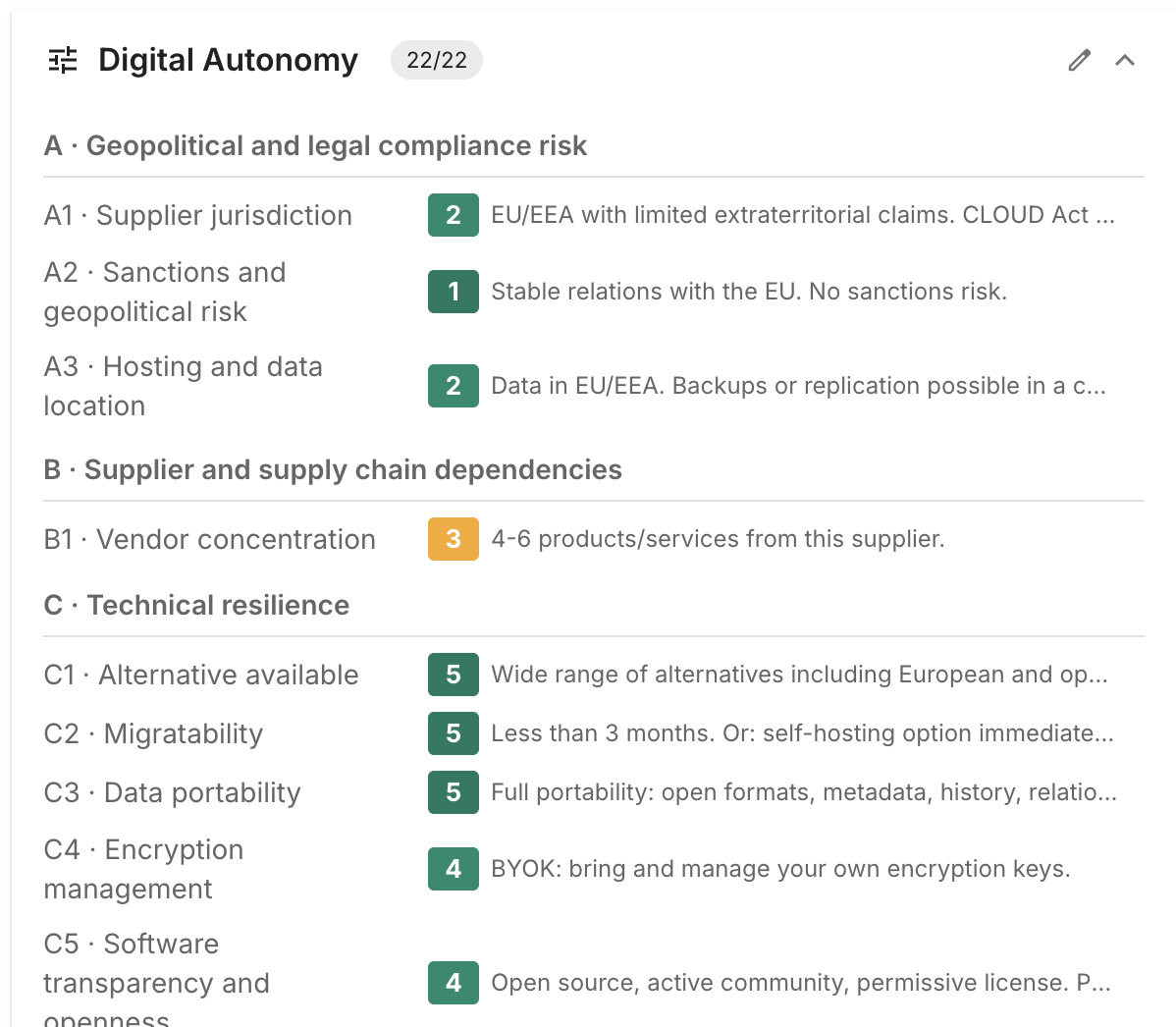
Click a number to score; click the selected number again to clear it. Hovering a number shows the rubric sentence for that level, and each indicator carries expandable help with the DAAF guidance note and definitions of the terms it uses (adequacy decision, CLOUD Act, FISA 702, and so on).
Indicators marked Quick are the nine that make up the quick scan.
| Dimension | Indicator | Weight | Quick |
|---|---|---|---|
| A · Geopolitical and legal compliance risk | A1 · Supplier jurisdiction | 3 | ✔ |
| A2 · Sanctions and geopolitical risk | 2 | ||
| A3 · Hosting and data location | 2 | ✔ | |
| B · Supplier and supply chain dependencies | B1 · Vendor concentration | 3 | ✔ |
| C · Technical resilience | C1 · Alternative available | 3 | ✔ |
| C2 · Migratability | 3 | ||
| C3 · Data portability | 3 | ||
| C4 · Encryption management | 2 | ||
| C5 · Software transparency and openness | 3 | ||
| D · Organisational resilience | D1 · Internal expertise and knowledge continuity | 3 | ✔ |
| D2 · Exit plan in place | 3 | ||
| D3 · Backup strategy | 2 | ||
| E · Contractual resilience | E1 · Exit clauses and transition arrangement | 3 | ✔ |
| E2 · Contractual flexibility | 2 | ||
| F · Organisational importance | F1 · Impact on outage | 3 | ✔ |
| F2 · Integration dependencies | 2 | ||
| G · Data sensitivity, access management and policy | G1 · Personal data | 3 | ✔ |
| G2 · Research data and knowledge security | 3 | ||
| G3 · Intellectual property | 2 | ||
| H · Academic impact | H1 · Academic freedom | 3 | ✔ |
| H2 · Research collaboration | 2 | ||
| H3 · Long-term archiving | 2 |
Which direction is good?
The rubrics are not all oriented the same way, and the widget colours them accordingly. For risk indicators (A, B, F, G, H) 1 is best — for example A1 level 1 is "EU/EEA jurisdiction. No extraterritorial claims. Full EU protection." and level 5 is "No adequacy decision, no safeguards. Direct access by foreign governments." For capability indicators (C, D, E) 5 is best. You never have to remember which is which: the buttons are colour-graded and the end captions read Low and High.
The score
The read-only Digital autonomy score section sits below the indicators and is computed automatically whenever you save.
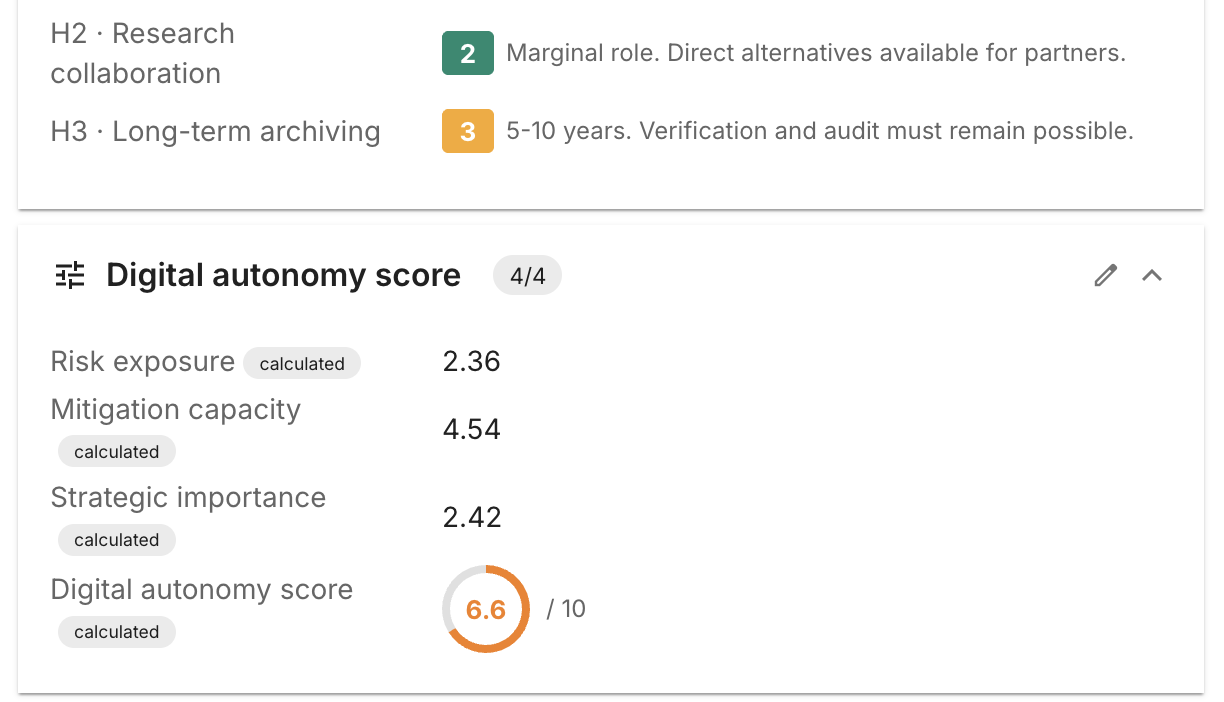
| Field | Meaning |
|---|---|
| Risk exposure | Weighted mean of dimensions A (geopolitical) and B (vendor concentration) |
| Mitigation capacity | Weighted mean of C (technical), D (organisational) and E (contractual) resilience |
| Strategic importance | Weighted mean of F (organisational importance), G (data sensitivity) and H (academic impact) |
| Digital autonomy score | A single 1–10 figure combining the three, shown as a gauge |
Higher is better — 10 is optimal, 1 is urgent.
A partial assessment produces no score at all
Every formula is guarded: if even one indicator it needs is unrated, the score stays empty rather than showing a misleading number. An application only appears on the quadrant report once its assessment is complete.
Because the scores are stored on the card like any other field, they are available everywhere: the inventory grid, filters, exports, and your own reports.
Quick scan or full assessment
The extension ships two variants of the same four calculations — one reading all 22 indicators, one reading only the nine quick-scan indicators. Which pair is active decides both what is calculated and how many indicators the card shows.
Switch modes in Admin → Calculations:
- Full assessment (default) — the four rows named Digital Autonomy — … (full) are active; the (quick) rows are inactive. Cards show all 22 indicators.
- Quick scan — activate the four Digital Autonomy — … (quick) rows and deactivate the four (full) rows. Cards show only the nine quick indicators, and the score is computed from those.
There is no separate display toggle
This one choice in Admin → Calculations is the whole switch. The card hides the 13 full-only indicators automatically when the quick set is active, and the report follows the same setting. Do not activate both variants at once — they target the same fields.
Collecting scores by survey
Rather than filling 22 indicators for every application yourself, send them to the people who know. On Admin → Surveys, use New from template:
- New DAAF survey — Quick (9) creates a DAAF Quick Scan draft.
- New DAAF survey — Full (22) creates a DAAF Full Assessment draft.
Both target Application cards and open in the survey builder as a draft, so nothing is sent until you review it. Pick the stakeholder role that should receive it (and any filters — a lifecycle stage, a subtype), then send. Respondents get the same 1–5 rubric widget and the same inline help as on the card, and applying the responses writes the scores back to the cards.
You can mint a fresh survey from a template as often as you like — an annual re-assessment is just another click.
The autonomy quadrant report
Reports → Digital Autonomy plots every fully assessed application.
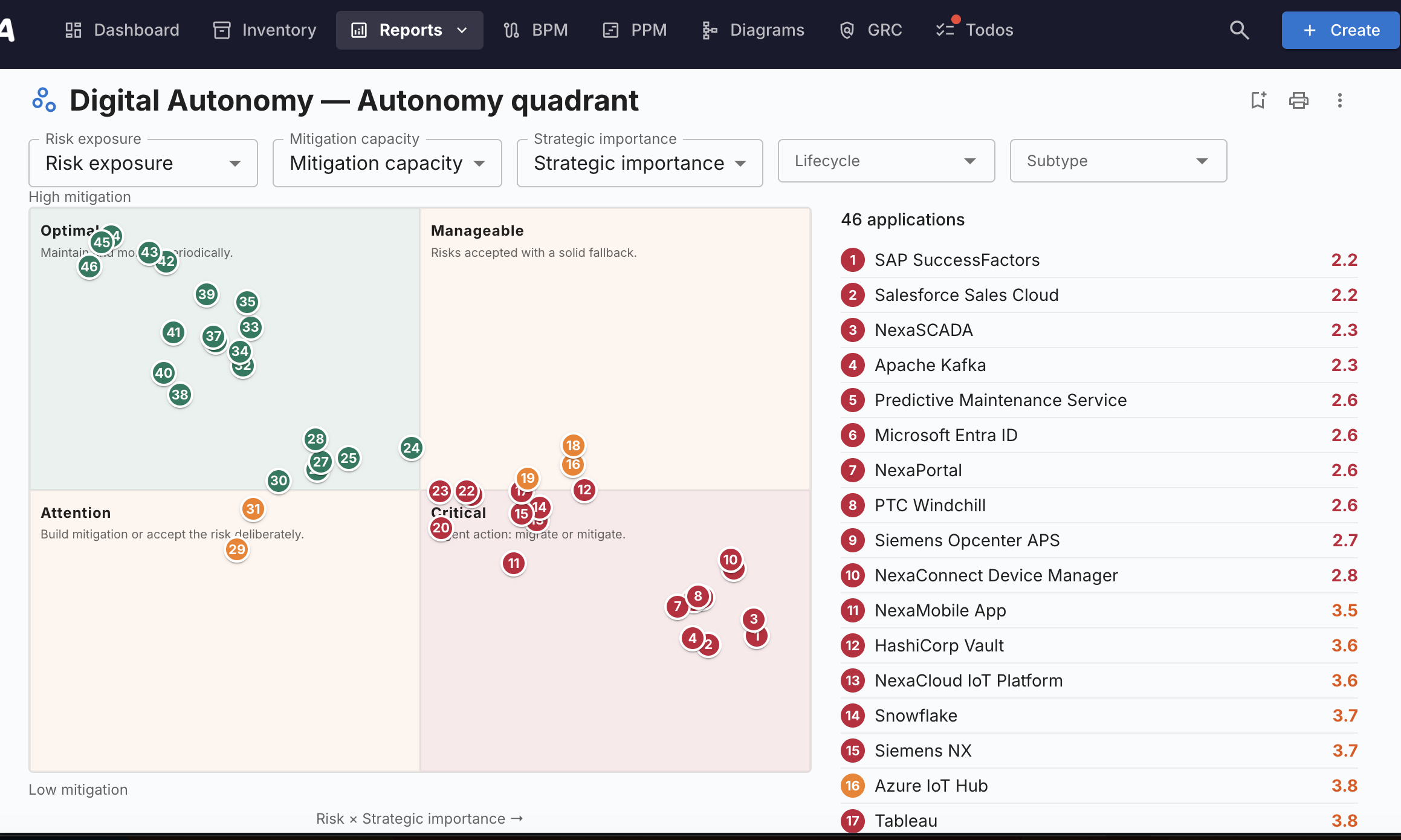
The horizontal axis is risk × strategic importance, the vertical axis is mitigation capacity (high at the top), giving four quadrants:
| Quadrant | What it means | What to do |
|---|---|---|
| Optimal | Low exposure, strong mitigation | Maintain and monitor periodically. |
| Manageable | High exposure, but a solid fallback | Risks accepted with a solid fallback. |
| Attention | Low exposure, weak mitigation | Build mitigation or accept the risk deliberately. |
| Critical | High exposure, weak mitigation | Urgent action: migrate or mitigate. |
Each dot is numbered and matches a row in the list beside the plot, which is ranked by score ascending — most urgent first. Click any dot or row to open the application in a side panel without leaving the report.
Filters and axes
- Risk exposure, Mitigation capacity and Strategic importance pickers let you plot different numeric fields on each axis — useful if you maintain your own equivalents. Your choice is remembered in your browser.
- Lifecycle and Subtype narrow the population.
The report supports the usual saving, sharing, printing and export. A saved view appears under Reports → Saved.
Permissions
| Permission | Grants |
|---|---|
ext.digital-autonomy.view |
See the Reports → Digital Autonomy report |
Scoring indicators uses your normal card edit rights on Application cards — anyone who may edit an application may score it. Switching between quick and full mode, and creating surveys from the templates, use the normal administrator rights for Admin → Calculations and Admin → Surveys.
If the extension is disabled or removed
Disabling or uninstalling strips the two sections from the Application card type but never touches the values stored on your cards. Re-enable the extension and every score reappears exactly as it was. The contributed fields are merged additively, so any fields your administrators added to those sections themselves are preserved too.
Languages
Indicator labels, questions, rubrics and help text are provided in English, German, French, Spanish, Italian and Danish. In Portuguese, Chinese, Russian and Arabic the framework content falls back to English — the source framework does not provide those languages.
Attribution and licence
This extension reproduces the Digital Autonomy Assessment Framework (DAAF), created at Utrecht University by Tim van Neerbos (Lead Enterprise Architect) as part of the Digital Autonomy project.
- Source: https://github.com/utrechtuniversity/digital-autonomy-assessment-tool
- Original tool: https://utrechtuniversity.github.io/digital-autonomy-assessment-tool/
- Licence: Creative Commons Attribution-NonCommercial-ShareAlike 4.0 International (CC BY-NC-SA 4.0) — https://creativecommons.org/licenses/by-nc-sa/4.0/
- © 2026 Universiteit Utrecht — Tim van Neerbos
Changes were made. The framework's indicators, weights, rubrics, help notes and 1–10 scoring were adapted to run natively inside Turbo EA at the Application-card level — a custom 1–5 rating field type, the level and score calculations, survey templates, and the autonomy-quadrant report.
The multilingual rubric and help translations originate from the DAAF project (created with the help of Thomas Steenbergen, SIVON; German, French, Spanish, Italian and Danish are best-effort per the source and not yet natively reviewed).
Per the framework's NonCommercial term this extension is distributed free of charge, and under ShareAlike the adapted DAAF content it carries remains licensed under CC BY-NC-SA 4.0.