DORA Register of Information
Every EU financial entity must maintain a Register of Information on all its ICT third-party arrangements and file it annually through its supervisor — 15 interlocking templates, submitted as a machine-readable xBRL-CSV package against the EBA's reporting framework. In the ESAs' dry run, 93.5% of submissions had at least one data error, and 86% of those were missing mandatory information.
The data the register needs is exactly what your EA repository already holds. DORA Register of Information turns Turbo EA into your register.
The register lives on your cards
This extension keeps no tables of its own for register content. Every register object is a card or a relation:
| Register object | In Turbo EA |
|---|---|
| Legal entities in scope | Organization cards with In DORA register scope switched on |
| Branches | Organization cards with the Branch subtype, children of their head office |
| ICT third-party providers | Provider cards |
| Contractual arrangements | ICT Arrangement cards (a new card type) |
| ICT services | ICT Service cards (a new card type) |
| Critical or important functions | Business Capability / Business Process cards flagged as register functions |
| Signing / using / providing parties, supply chains | Relations between those cards |
That is the whole design: every field is edited in Turbo EA's own card detail with its required markers, validation, help text and data-quality scoring, and the register is assembled live from the cards whenever you validate or export.
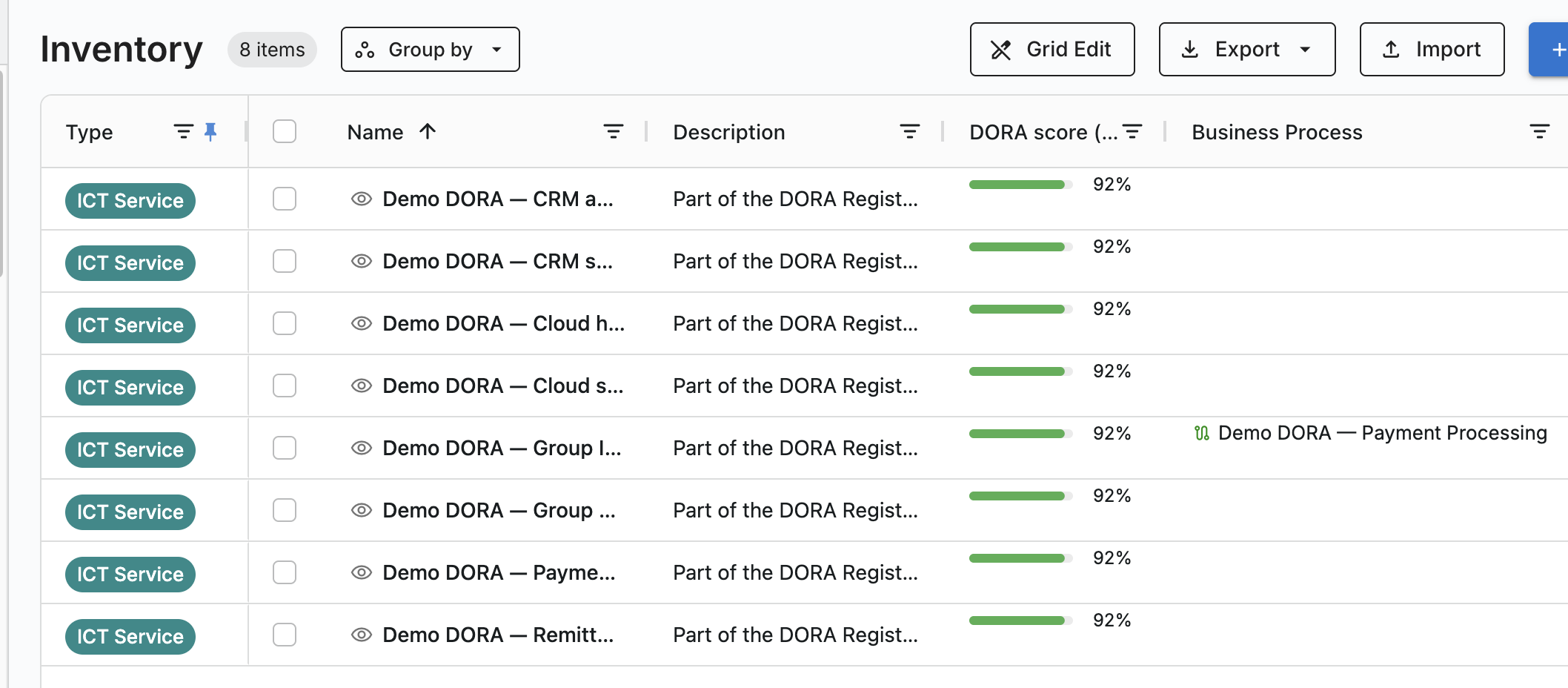
There is deliberately no DORA card tab
The contributed fields render as ordinary attribute sections on a card, and every register link is a normal relation. Nothing about maintaining the register is a special mode.
At a glance
| Licence | Commercial — a signed entitlement is required |
| Minimum Turbo EA version | 2.94.0 |
| Permissions | ext.dora-roi.view, ext.dora-roi.manage, ext.dora-roi.submit, ext.dora-roi.admin |
| Data access grants | core.cards.read, core.cards.write, metamodel.custom_field_types |
| Backend restart needed | Yes — it ships backend code |
| Where it appears | DORA Register in the main navigation · Reports → DORA Register · DORA Register / DORA Function sections on cards · six survey templates |
What it adds to your metamodel
Two new card types
- ICT Arrangement — a contractual arrangement on the use of ICT services. It is hierarchical: overarching arrangements are parents and subsequent or associated arrangements are their children. Carries annual expense and currency.
- ICT Service — one per service delivered under an arrangement, carrying both the service row (type, dates, notice periods, governing law, data location, reliance) and its Assessment (substitutability, exit plan, reintegration, impact of discontinuation, alternative providers).
One new subtype — Branch on Organization.
New sections on existing card types
| Card type | Section | Contains |
|---|---|---|
| Organization | DORA Register | In DORA register scope, LEI, Country, Type of entity, Hierarchy in group, Competent authority, Total assets, Reporting currency, Branch code |
| Provider | DORA Register | LEI, Identifier type, EUID, Person type, Country of headquarters, Intra-group provider, annual expense, ultimate parent |
| Business Capability / Business Process | DORA Function | DORA register function, Function identifier, Licenced activity, Criticality assessment, Reasons for criticality, RTO, RPO, Impact of discontinuing |
Every section also carries a read-only DORA score (%) — a completeness bar showing how much of the register data that card still owes.
Nine relation types, of which two carry attributes you set per relation:
- Organization → ICT Arrangement (is party to) has a DORA roles attribute: Signing entity, Using the ICT services, Providing entity (intra-group).
- ICT Service → Provider (is provided by) has a Supply-chain rank: Rank 1 is the direct provider, and deeper ranks are subcontractors.
The extension also adds a DORA regulation to the core compliance scanner.
Getting started
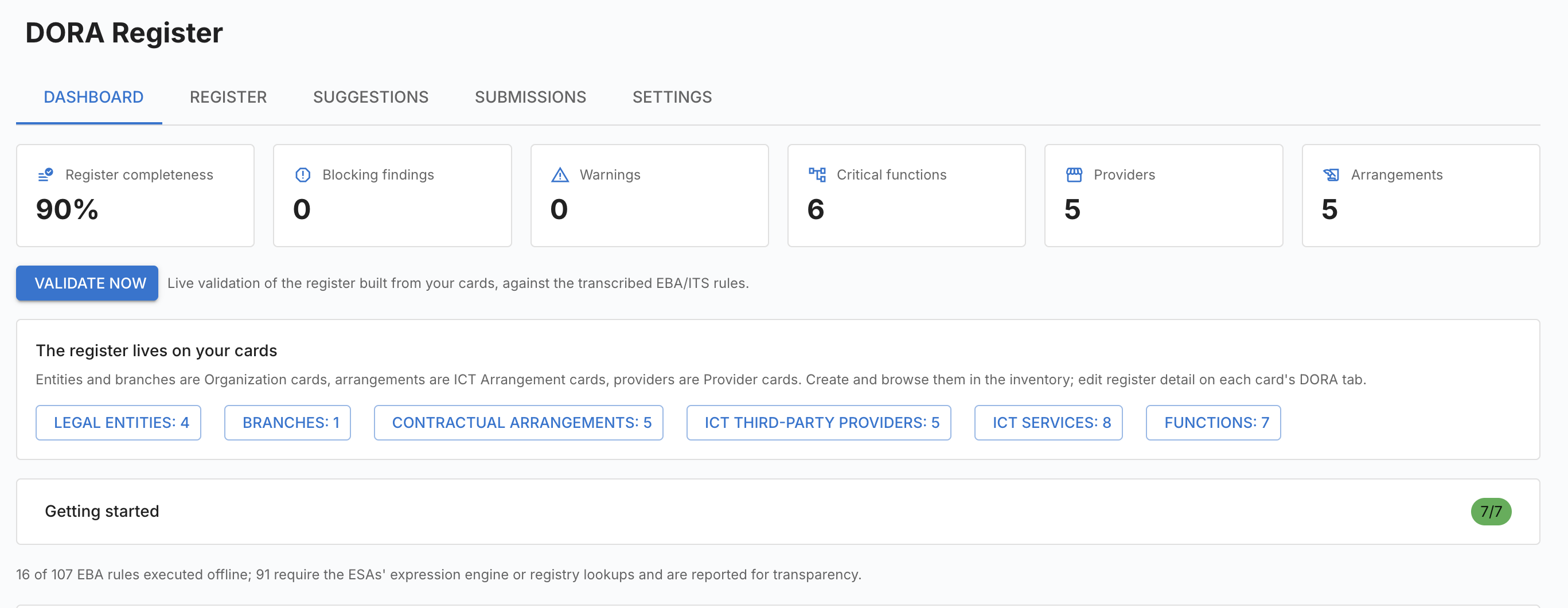
The workbench opens on a Dashboard with a Getting started checklist that tracks these seven steps and shows how many are done.
- Pick the reporting entity in Settings — the entity whose register this is.
- Mark your legal entities. On each Organization card, fill the DORA Register section: switch on In DORA register scope and give the LEI, country, type of entity and hierarchy in group. Branches are Organization cards with the Branch subtype, parented to their head office.
- Create an ICT Arrangement card per contractual arrangement. Make follow-on contracts children of the master — that is what derives the arrangement type and overarching reference.
- Relate each arrangement to its Provider card and to the entities that sign, use or provide it, setting the DORA roles attribute on each.
- Create one ICT Service card per service, then relate it to its contract, to the entities using it, to the functions it supports, and to its ranked providers.
- Mark the functions. Switch on DORA register function on the Business Capability or Business Process cards that are critical or important functions and complete their DORA Function section — or accept proposals from Suggestions.
- Validate the register and clear the findings.
Collect the data from the people who own it
Six survey templates on Admin → Surveys → New from template collect the mandatory data from card owners: DORA entity data, DORA provider data, DORA arrangement data, DORA ICT service data, and DORA function data for capabilities and for processes. Each opens as a draft.
What you never have to type
The register derives these rather than asking for them: the parent LEI (from the
card hierarchy), integration and deletion dates (from card lifecycle), the
arrangement type and overarching reference (from the arrangement hierarchy), the
branch nature (from the Branch subtype), the recipient of a sub-contracted
service (from the provider ranking), and the last-update date. The provider
scope is likewise derived — only Provider cards actually referenced by an
arrangement or a supply chain enter the register, so unrelated vendors stay out
automatically. The ITS fill-in conventions (9999-12-31 for open-ended dates,
not applicable for non-subsequent arrangements) are applied for you.
The workbench
DORA Register in the main navigation has five tabs. The same dashboard is also available as a saveable report under Reports → DORA Register.
Dashboard
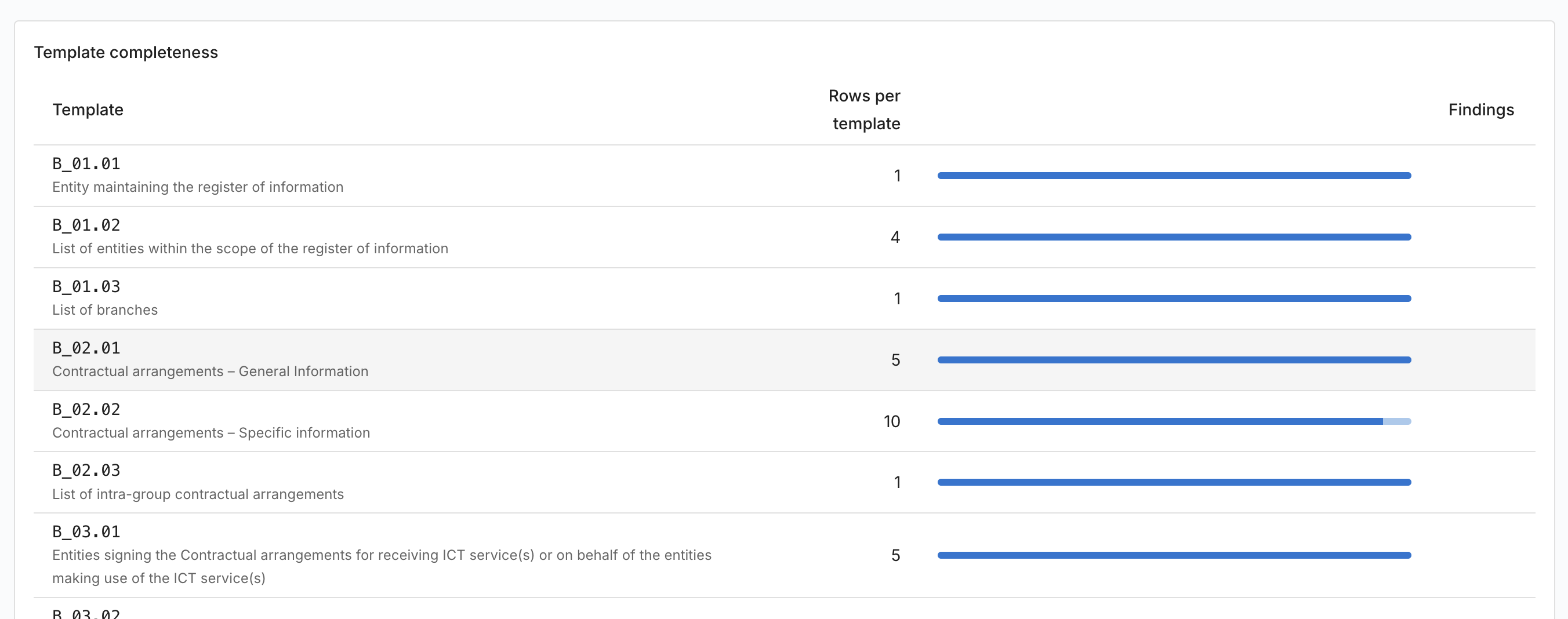
Six tiles — Register completeness, Blocking findings, Warnings, Critical functions, Providers, Arrangements — over a Validate now button. Below them, a panel of counts links straight into the inventory for each register object, and the Template completeness table shows rows and findings per template.
Clicking a findings count opens the Validation findings drawer, grouped by register row, each finding classified as Missing, Invalid value, Duplicate row, Broken reference, Unknown column or EBA rule, and marked Blocking or Warning. Every finding has an Open card button that takes you to exactly the field that needs fixing.
Register
Six views — Legal entities, Branches, Contractual arrangements, ICT third-party providers, ICT services and Functions — each a grid of the cards behind that part of the register, with a search box, a New … button that creates a card with the right type and flags preset, and an Open in inventory link. Clicking a row opens the card in a side panel.
Suggestions
Find suggestions walks your Provider → Application → Capability/Process relations and proposes register updates — functions you have not marked, and criticality upgrades — each with the evidence behind it. Nothing is written until you press Accept on a row; Dismiss removes it from the list.
Submissions
New snapshot captures the register at a reference date. Each snapshot then moves through three states:
- Draft — press Validate to check it. Findings are listed with severity, template, row, column and message.
- Validated — press Finalize. This is refused while any blocking finding remains, and while no reporting entity with a LEI is set.
- Final — the snapshot is immutable, its package hash is pinned for audit, and it can no longer be deleted or re-validated.
Two downloads are available at any point:
- xBRL-CSV package — the official EBA framework 4.0 DORA report package as a
.zip, containing the report metadata, filing indicators, parameters and one CSV per template. It is byte-reproducible, and a re-download of a final snapshot is checked against its pinned hash. - Excel workbook — a review workbook with a cover sheet, one sheet per template using the official column labels and codes, and a members sheet, for circulating the register internally before filing.
Settings
Filing — the Filing scope (Consolidated (.CON) or Individual (.IND)), Reporting currency, Taxonomy version, and the Reporting entity whose LEI and country drive the submission package.
Definitions (B_99.01) — optional free-text definitions for the closed-list terms your register uses, filed as template B_99.01.
Demo data — Load demo data seeds a complete sample register (group entities and a branch, providers, overarching and intra-group arrangements, a three-deep supply chain, critical functions, suggestions and a draft snapshot) so you can explore every feature before touching real data. All demo cards are named Demo DORA — … and tagged Demo Dora; Remove demo data takes them away again.
The 15 templates
| Template | Content |
|---|---|
| B_01.01 | Entity maintaining the register of information |
| B_01.02 | List of entities within the scope |
| B_01.03 | List of branches |
| B_02.01 | Contractual arrangements – general information |
| B_02.02 | Contractual arrangements – specific information |
| B_02.03 | List of intra-group contractual arrangements |
| B_03.01 / B_03.02 / B_03.03 | Signing parties |
| B_04.01 | Entities making use of the ICT services |
| B_05.01 | ICT third-party service providers |
| B_05.02 | ICT service supply chains |
| B_06.01 | Functions identification |
| B_07.01 | Assessment of the ICT services |
| B_99.01 | Definitions |
Validation
Validation runs in four layers: structure (data types, LEI checksums, dates, numbers, plus the mandatory-field flags as blocking), members (closed-list values against the official domains), keys (primary-key completeness and uniqueness, and cross-template references), and the EBA rule inventory at its published severities.
Coverage is partial — and reported honestly
Turbo EA executes the rules it can evaluate offline. Rules that need the ESAs' own expression engine, or live GLEIF/BRIS registry lookups, cannot run on your instance. Rather than silently skipping them, the dashboard states how many of the EBA rules were executed and how many were not. Treat a clean validation as a strong pre-check, not as a guarantee of supervisory acceptance.
Permissions
| Permission | Grants |
|---|---|
ext.dora-roi.view |
View the register, dashboards and validation results |
ext.dora-roi.manage |
Edit register data and decide graph suggestions |
ext.dora-roi.submit |
Freeze reference-date snapshots and download submission packages |
ext.dora-roi.admin |
Configure filing settings and load or remove demo data |
Editing the register data itself also uses your normal card-edit rights, since every register field lives on a card.
If the licence lapses or the extension is disabled
The workbench and its reports disappear and the card-data bridge stops, but nothing is deleted. Your register lives on ordinary cards and relations, so every value stays exactly where it is, visible and editable in the inventory. Snapshots and settings are preserved. Applying a renewed licence restores the workbench immediately.
If you see The card-data bridge is unavailable, the extension is installed but not licensed, or the backend has not been restarted since installing it.
Notes and limitations
- Version 2.0.0 was a breaking change. Registers built on earlier versions stored services and functions in the extension's own tables; those rows are not migrated. Re-enter them as ICT Service and function cards (or reload the demo data) and re-run Find suggestions.
- Taxonomy content is generated from the published EBA framework, so adopting a new framework release is a data update plus a Taxonomy version switch.
- The DORA score on a card is a triage signal, not a compliance verdict. The dashboard's findings are the authoritative gap list.
- Supervisor-specific Excel template variants are not produced; the xBRL-CSV package is the filing artefact.