Catalogo dei flussi di valore
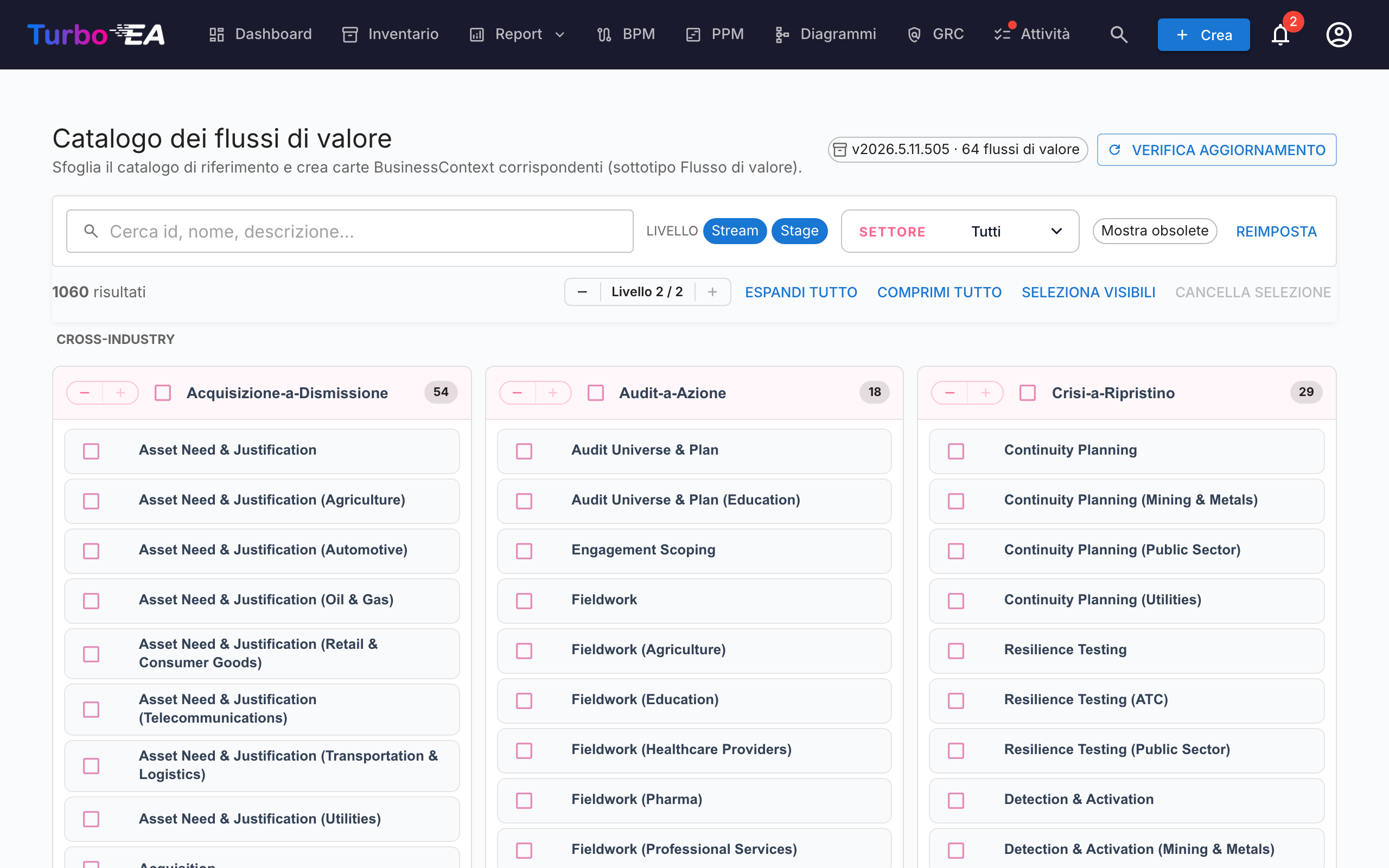
Turbo EA include il Catalogo di riferimento dei flussi di valore — un insieme curato di flussi di valore end-to-end (Acquire-to-Retire, Order-to-Cash, Hire-to-Retire, …), mantenuto insieme ai cataloghi di capacità e processi su github.com/vincentmakes/turbo-ea-capabilities. Ogni flusso si scompone in fasi che puntano alle capacità che mette in opera e ai processi che lo realizzano, fornendo un ponte già pronto tra architettura di business (capacità) e architettura dei processi (processi).
La pagina Catalogo dei flussi di valore permette di sfogliare questa raccolta e di creare in massa le carte BusinessContext (sottotipo Value Stream) corrispondenti.
Aprire la pagina
Cliccate sull'icona utente in alto a destra nell'app, espandete Cataloghi di riferimento nel menu (la sezione è chiusa per impostazione predefinita per mantenere il menu compatto) e cliccate su Catalogo dei flussi di valore. La pagina è accessibile a chiunque disponga del permesso inventory.view.
Cosa vedete
- Intestazione — la versione attiva del catalogo, il numero di flussi di valore contenuti e (per gli amministratori) i comandi per cercare e scaricare aggiornamenti.
- Barra dei filtri — ricerca a testo libero su id, nome, descrizione e note, chip di livello (Flusso / Fase), selezione multipla di settore e interruttore «Mostra obsoleti».
- Griglia L1 — una scheda per flusso, con le sue fasi elencate come figli. Ogni fase porta il proprio ordine, un'eventuale variante di settore e gli id delle capacità e dei processi che tocca.
Selezionare flussi di valore
Spuntate la casella accanto a un flusso o a una fase per aggiungerli alla selezione. La selezione si propaga come negli altri cataloghi. Selezionare una fase trascina automaticamente il suo flusso padre al momento dell'import, in modo da non lasciare fasi orfane — anche se non avete spuntato il flusso.
Flussi e fasi che esistono già nel vostro inventario compaiono con un'icona di spunta verde al posto della casella.
Creare carte in massa
Non appena è selezionato almeno un flusso o una fase, in fondo alla pagina compare un pulsante fisso Crea N elementi. Utilizza il normale permesso inventory.create.
Alla conferma, Turbo EA:
- crea una carta
BusinessContextper ogni voce selezionata, con sottotipo Value Stream sia per i flussi sia per le fasi; - collega il
parent_iddi ogni carta di fase al suo flusso padre, riproducendo così la gerarchia del catalogo; - crea automaticamente relazioni
relBizCtxToBC(«è associato a») da ogni nuova fase verso ogni cartaBusinessCapabilityesistente che la fase mette in opera (capability_ids); - crea automaticamente relazioni
relProcessToBizCtx(«utilizza») da ogni cartaBusinessProcessesistente verso ogni nuova fase (process_ids). Attenzione al verso: nel metamodello di Turbo EA il processo è la sorgente, non la fase; - salta i riferimenti incrociati la cui carta di destinazione non esiste ancora; gli id di origine restano salvati negli attributi della fase (
capabilityIds,processIds) così potrete collegarli più tardi importando gli artefatti mancanti; - timbra le carte di fase con
stageOrder,stageName,industryVariant,notese le liste originalicapabilityIds/processIds.
I conteggi di saltati, creati e ri-collegati sono riportati come per il catalogo delle capacità. Gli import sono idempotenti.
Vista dettaglio
Cliccate sul nome di un flusso o di una fase per aprire un dialogo di dettaglio. Per le fasi, il pannello mostra inoltre:
- Ordine di fase — la posizione ordinale della fase all'interno del flusso.
- Variante di settore — valorizzata quando la fase è una specializzazione settoriale della base trasversale.
- Note — dettagli liberi aggiuntivi presi dal catalogo.
- Capacità in questa fase e Processi in questa fase — chip per gli id di BC e BP referenziati dalla fase. Utili per individuare carte mancanti prima dell'import.
Aggiornare il catalogo (amministratori)
Il catalogo viene fornito integrato come dipendenza Python, perciò la pagina funziona offline / in installazioni isolate dalla rete. Gli amministratori (admin.metamodel) possono prelevare a richiesta una versione più recente tramite Verifica aggiornamenti → Scarica v…. Lo stesso download del wheel reidrata contemporaneamente le cache dei cataloghi di capacità e processi, perciò aggiornare uno qualunque dei tre cataloghi di riferimento li aggiorna tutti.