Catalogo dei processi
Turbo EA include il Catalogo di riferimento dei processi di business — un albero di processi ancorato ad APQC-PCF, mantenuto insieme al catalogo delle capacità su github.com/vincentmakes/turbo-ea-capabilities. La pagina Catalogo dei processi permette di sfogliare questa raccolta e di creare in massa le carte BusinessProcess corrispondenti.
Aprire la pagina
Cliccate sull'icona utente in alto a destra nell'app, espandete Cataloghi di riferimento nel menu (la sezione è chiusa per impostazione predefinita per mantenere il menu compatto) e cliccate su Catalogo dei processi. La pagina è accessibile a chiunque disponga del permesso inventory.view.
Cosa vedete
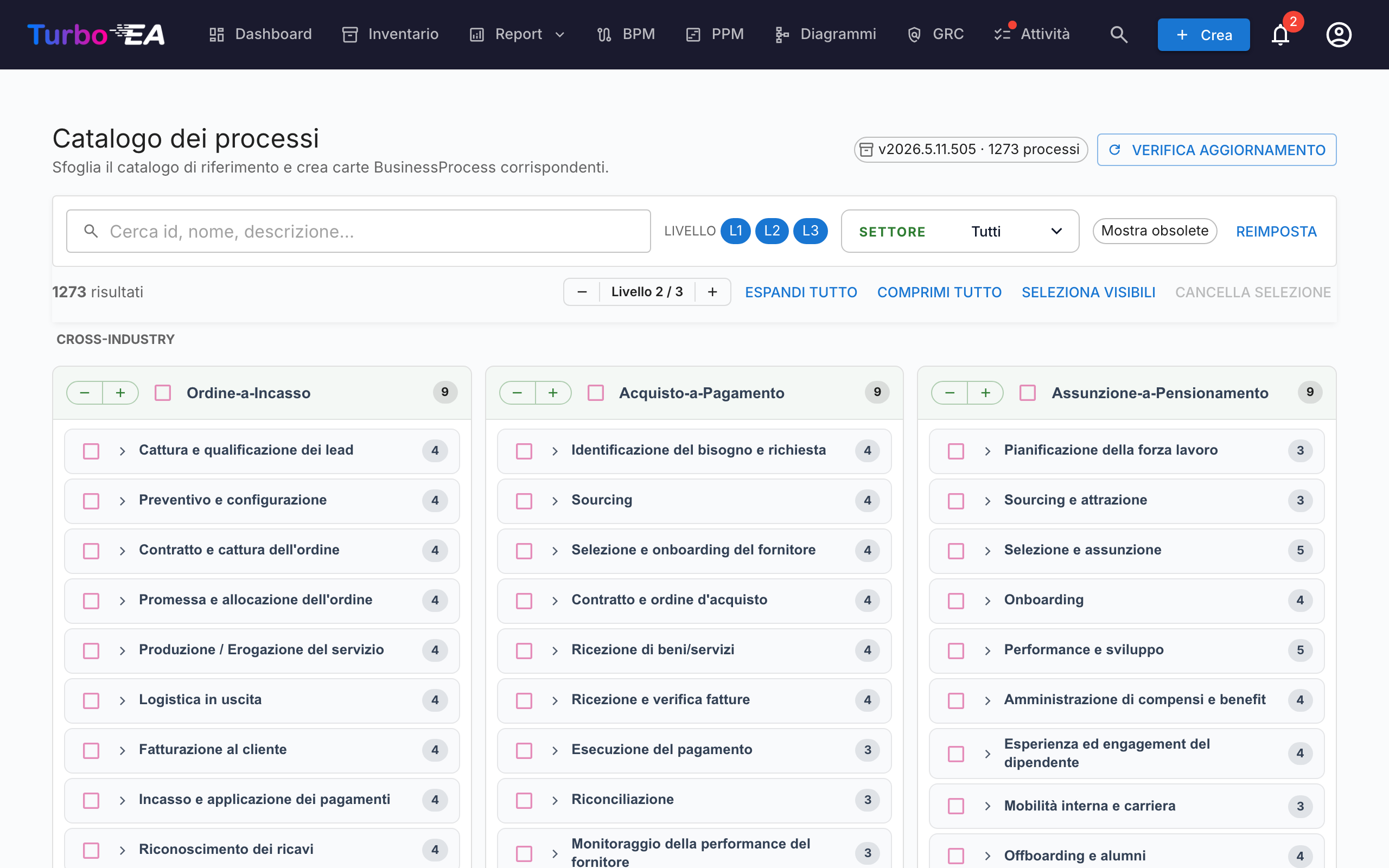
- Intestazione — la versione attiva del catalogo, il numero di processi contenuti e (per gli amministratori) i comandi per cercare e scaricare aggiornamenti.
- Barra dei filtri — ricerca a testo libero su id, nome, descrizione e alias, oltre a chip di livello (L1 → L4 — Categoria → Gruppo di processi → Processo → Attività, in linea con APQC PCF), una selezione multipla di settore e un interruttore «Mostra obsoleti».
- Barra delle azioni — contatori delle corrispondenze, lo stepper globale di livello, espandi/comprimi tutto, seleziona i visibili, pulisci selezione.
- Griglia L1 — una scheda per ogni categoria di processo L1, raggruppate sotto intestazioni di settore. I processi trasversali (Cross-Industry) sono fissati in alto; gli altri settori seguono in ordine alfabetico.
Selezionare i processi
Spuntate la casella accanto a un processo per aggiungerlo alla selezione. La selezione si propaga nel sottoalbero come nel catalogo delle capacità — spuntare un nodo aggiunge quel nodo e tutti i discendenti selezionabili; togliere la spunta rimuove lo stesso sottoalbero. Gli antenati non vengono mai toccati.
I processi che esistono già nel vostro inventario compaiono con un'icona di spunta verde al posto della casella. L'abbinamento privilegia il marchio attributes.catalogueId lasciato da un import precedente e, in mancanza, ricade su un confronto del nome senza distinzione maiuscole/minuscole.
Creare carte in massa
Non appena è selezionato almeno un processo, in fondo alla pagina compare un pulsante fisso Crea N processi. Utilizza il normale permesso inventory.create.
Alla conferma, Turbo EA:
- crea una carta
BusinessProcessper ogni voce selezionata, con il sottotipo derivato dal livello del catalogo: L1 →Process Category, L2 →Process Group, L3 / L4 →Process; - preserva la gerarchia del catalogo tramite
parent_id; - crea automaticamente relazioni
relProcessToBC(supporta) verso ogni cartaBusinessCapabilityesistente elencata inrealizes_capability_idsdel processo. Il dialogo di esito indica quante auto-relazioni sono state generate; i target ancora assenti dall'inventario vengono saltati in silenzio. Rieseguire l'import dopo aver aggiunto le capacità mancanti è sicuro — gli id di origine restano sulla carta, così potete ricollegarli manualmente in seguito; - timbra ogni carta nuova con
catalogueId,catalogueVersion,catalogueImportedAt,processLevel(L1..L4) e iframeworkRefs,industry,references,inScope,outOfScope,realizesCapabilityIdsprovenienti dal catalogo.
I conteggi di saltati, creati e ri-collegati sono riportati come per il catalogo delle capacità. Gli import sono idempotenti — rieseguirli non genera duplicati.
Vista dettaglio
Cliccate sul nome di un processo per aprire un dialogo di dettaglio con il percorso, la descrizione, il settore, gli alias, le referenze e una vista interamente espansa del suo sottoalbero. Nel catalogo dei processi il pannello mostra inoltre:
- Referenze di framework — identificativi APQC-PCF / BIAN / eTOM / ITIL / SCOR portati nel
framework_refsdel catalogo. - Realizza capacità — gli id delle BC che il processo realizza (un chip per id), per individuare a colpo d'occhio le carte di capacità mancanti.
Aggiornare il catalogo (amministratori)
Il catalogo viene fornito integrato come dipendenza Python, perciò la pagina funziona offline / in installazioni isolate dalla rete. Gli amministratori (admin.metamodel) possono prelevare a richiesta una versione più recente tramite Verifica aggiornamenti → Scarica v…. Lo stesso download del wheel reidrata contemporaneamente le cache dei cataloghi di capacità e flussi di valore, perciò aggiornare uno qualunque dei tre cataloghi di riferimento da una qualsiasi delle tre pagine li aggiorna tutti.
L'URL dell'indice PyPI è configurabile tramite la variabile d'ambiente CAPABILITY_CATALOGUE_PYPI_URL (il nome è condiviso fra i tre cataloghi — il wheel li copre tutti).